AI11 min readBy JH Akash
n8n Nod: Free Open-Source AI Agent on Your PC
n8n's Nod is the free, open-source personal AI agent that runs on your own computer with any model you pick. How it works, how to install it in 7 steps, and how it stacks up against Dots, Duet, and Grokbot.
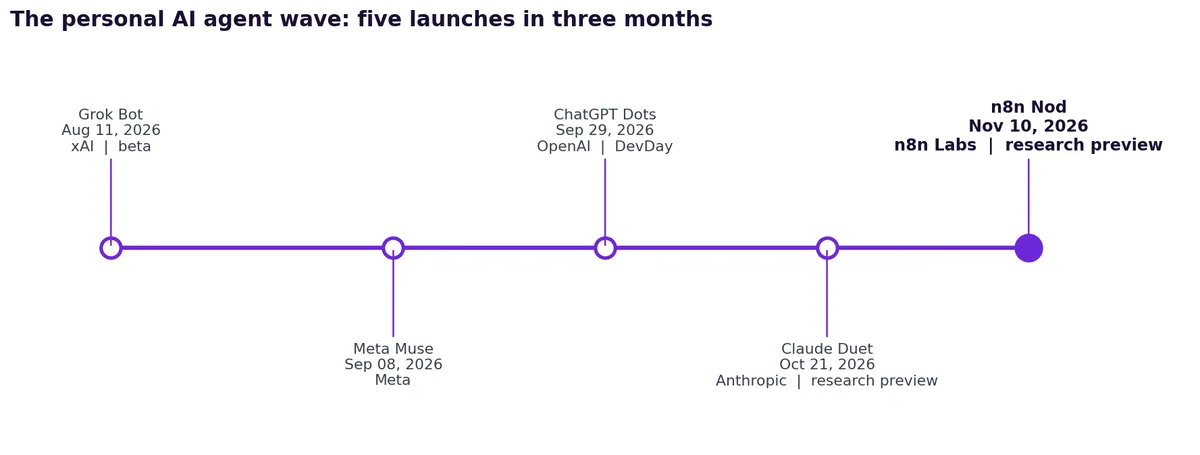
In the last three months, every big AI lab shipped the same idea: a personal agent that keeps working after you close the app. Meta launched Muse, OpenAI launched Dots, Anthropic launched Duet, and xAI launched Grok Bot. On November 10, 2026, n8n joined them with Nod, and Nod is the odd one out. It is free, it is open source, and it runs on your own computer instead of a cloud server.
This article breaks down what Nod is, how it is different from Dots, Duet, Grokbot, and Muse, how to install it in seven easy steps, and what it is actually good at. It is based on Chase AI's video walkthrough and n8n's own announcement, with the key facts checked against the GitHub repo and the official docs.
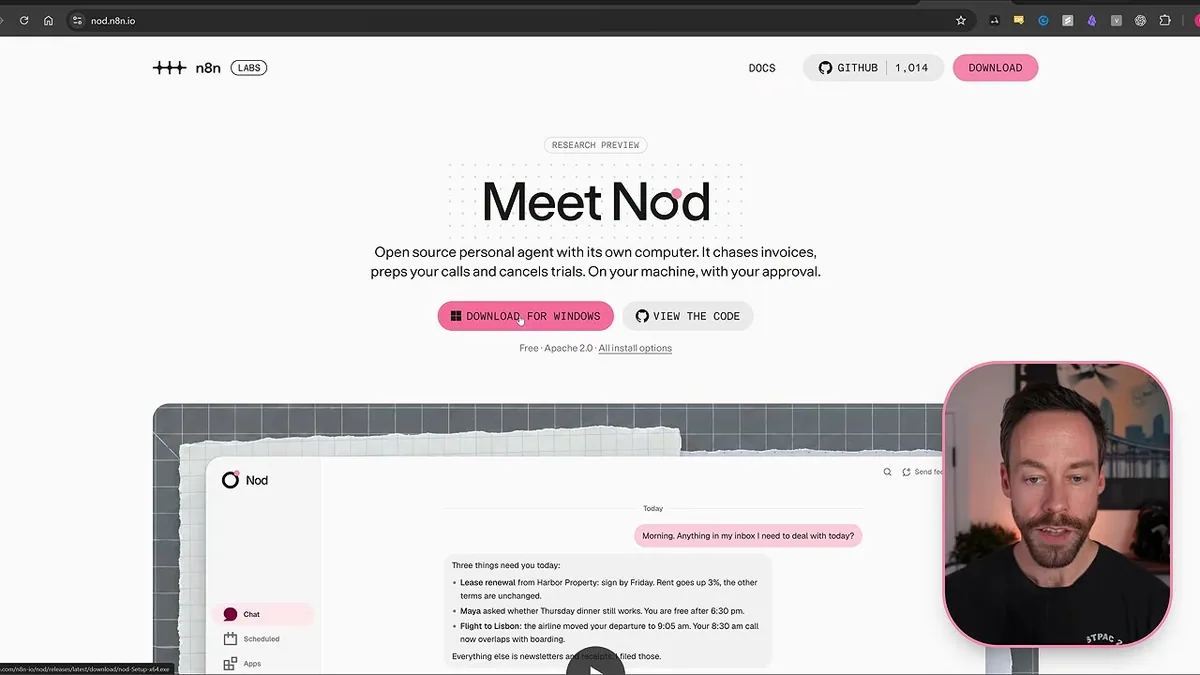
What is n8n Nod?
Nod is a standalone desktop app from n8n Labs, a new team inside n8n that experiments with ideas outside the core product. It is a personal AI agent with its own computer and browser. You tell it what you need, and it works in your apps and on real websites until the job is done.
Five facts to know first:
- Free and open source. Nod is free to download under the Apache 2.0 licence. The code is on GitHub at github.com/n8n-io/nod. There is no Nod subscription.
- It runs on your machine. Nod is a desktop app for Mac (macOS 14 or later) and Windows 11 (in preview, needs WSL 2). You can also self-host it on a Linux server. You do not need an n8n account.
- You pick the model. OpenAI, Anthropic, Gemini, OpenRouter, Bedrock, Azure, Vertex, 20+ other providers, a local model through Ollama, or your ChatGPT Plus or Pro sign-in. You pay your model provider for what Nod uses, or nothing at all with a local model.
- It asks before it acts. Nod checks with you before it sends, pays, or deletes anything you did not ask for. An email or a web page cannot give Nod permission. Only you can.
- It is a research preview. n8n calls it an early preview with rough edges and breaking changes. Version 0.6.0 landed on November 9, 0.6.1 on November 10, and 0.6.2 on November 11. It shot to #1 on Product Hunt on November 11 and passed 1,000 GitHub stars within four days of launch.
Nod is not n8n. n8n is the workflow automation platform where you build automations with nodes. Nod is a separate app. You do not build workflows in it.
Nod vs Dots: where the computer lives
Nod does about 90% the same jobs as ChatGPT Dots, Claude Duet, Grokbot, and Muse. The big difference is where the agent's computer lives, and which model powers it.
With Dots, you talk to the agent in the ChatGPT app. Your request goes to OpenAI's servers. The agent has its own virtual machine in the cloud, it is always on, and it runs on GPT-6 Astra. Your laptop can be shut down and Dots keeps working.
With Nod, you talk to the agent in a desktop app, or remotely through Telegram or WhatsApp. The request never goes to the cloud. Nod runs on a server on your computer, with its own sandboxed Linux virtual machine and its own browser. The model can be anything you connect.
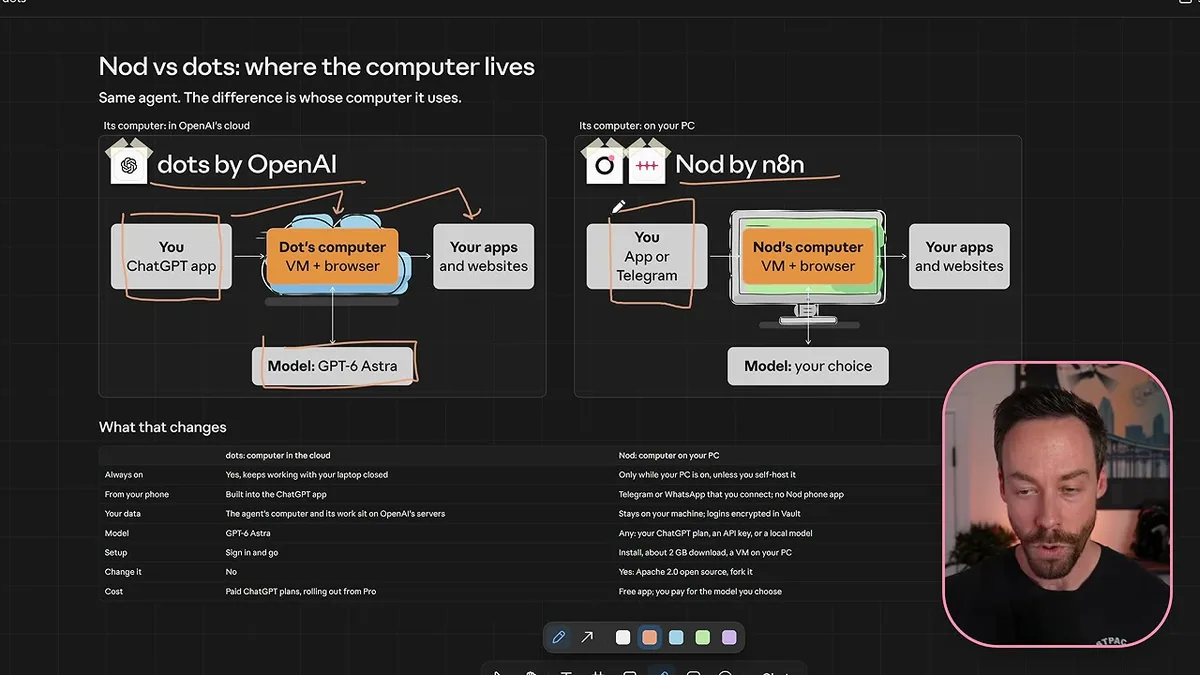
That one difference cuts both ways. Because the VM is on your machine, your data stays on your machine, and the work is sandboxed so the agent cannot mess up your computer. But if your computer is shut down, Nod is shut down too. There is no Nod phone app yet, so remote access means Telegram or WhatsApp. The fix, if you want it always on, is the same one people already use: run it on a computer that never shuts down, like a Mac Mini, or host it on a VPS.
The personal agent wave in one timeline
Five personal agents launched within three months. Nod is the newest, and the only open-source one.
Nod vs Dots vs Duet vs Grokbot vs Muse
| n8n Nod | ChatGPT Dots | Claude Duet | Grok Bot | Meta Muse | |
|---|---|---|---|---|---|
| Made by | n8n Labs | OpenAI | Anthropic | xAI | Meta |
| Launched | Nov 10, 2026 | Sep 29, 2026 | Oct 21, 2026 | Aug 2026 (beta) | Sep 8, 2026 |
| Where it runs | Your own PC | Cloud computer | Cloud computer | Cloud computer | Cloud (Secure VM) |
| Model | Any: OpenAI, Anthropic, Gemini, OpenRouter, local Ollama, or ChatGPT Plus/Pro | GPT-6 Astra only | Claude Opus 5.5 only | Routed by Grok Bot, no picker | Muse Spark only |
| Always on | Only while your PC is on (or on a VPS) | Yes | Yes | Yes | Yes |
| Reach it from | Desktop app, Telegram, WhatsApp | ChatGPT apps, Slack, Teams | Duet app, claude.ai | Desktop and mobile apps, Slack, X | Muse app, muse.ai, WhatsApp, Mac app |
| Open source | Yes, Apache 2.0 | No | No | No | No |
| App cost | Free | Included in ChatGPT Pro ($100+/mo) | Included in Claude Pro ($20/mo) or Max | Included in plans from $30/mo | Free tier, then $20 or $100/mo |
The pattern is simple. The four cloud agents lock you to one model and one bill. Nod locks you to nothing except a computer that stays on.
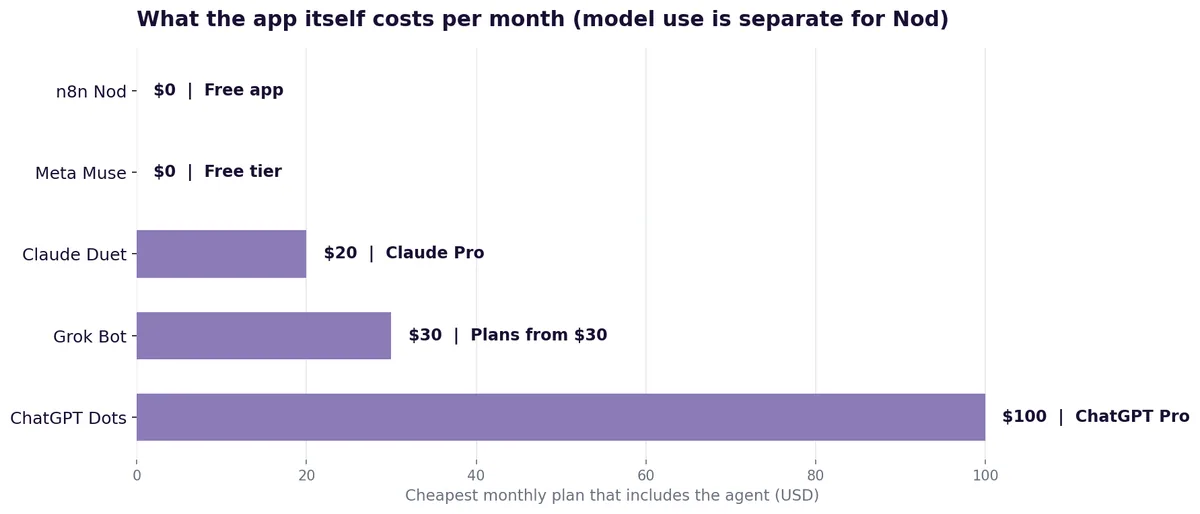
One honest note on cost: free does not mean zero. Nod the app costs nothing, but the model still has to be paid for, unless you run a local model or draw from a ChatGPT Plus or Pro plan you already pay for. The Usage tab shows every token in and out, so you can see exactly where the money goes.
Three things that make Nod different
1. Open source, so you can change how it works
Nod is Apache 2.0, and every rule it follows is in the code. You can fork it on GitHub, clone it, and adjust it however you want. Dots, Duet, Grokbot, and Muse are black boxes: you cannot change how the plumbing works. With Nod, you can.
2. Any model, including one that never leaves your computer
This is the flexibility the others do not offer. Run it on a local model through Ollama and you pay only for electricity. Hook it to OpenRouter and you get almost any model out there. Or connect your ChatGPT Plus or Pro account and let it draw from your monthly subscription instead of paying API prices.
n8n's own evaluation, run in October 2026 on simulated accounts and websites, had GPT-6.1 Sol and Claude Opus 5.5 get all 240 test decisions right. That is the maker's own test, not an independent benchmark, so treat it as a signal, not a guarantee.
3. The vault: your passwords never reach the AI
This is the cleverest part. When you give Nod a password or a credit card, it goes into the vault. The vault is never touched by the language model. When a website asks for a login, the Linux VM on your computer types the password in. The model never sees it. So Nod can do work on sites that need a login, and your credentials never get sent to an AI system in the cloud.
How to install Nod in 7 easy steps
- Go to nod.n8n.io. That is the official download page. You can also read the code first at github.com/n8n-io/nod.
- Download the installer for your system. Mac (Apple Silicon or Intel) or Windows 11. The download is about 2 GB, because it includes the virtual machine Nod runs in.
- Run the installer and open the app. On Windows, you need WSL 2. On Mac, you need macOS 14 or later.
- Click Get Started. If you are running Nod on your personal machine, this is the path the app shows you.
- Connect your email. Nod connects through Composio. For Gmail, click it, sign in, and give it access. This is how Nod reads your inbox and calendar.
- Tell it where you want help. Work, personal life, or both. Then tell it what you like to do, so it knows what kinds of tasks to expect.
- Pick your model and hit Continue. Use OpenRouter, your own server, an API key, a local model, or your ChatGPT Plus or Pro sign-in. Then choose the exact model and you land on the main chat screen.
That is the whole setup. No server to configure, no n8n account, no cloud service to set up first.
Inside the Nod app
The main screen is a chat. That chat is the orchestrator: everything you want done goes through it. It also suggests tasks right away, like summarising recent emails and drafting replies, or reviewing new email requests every weekday morning.
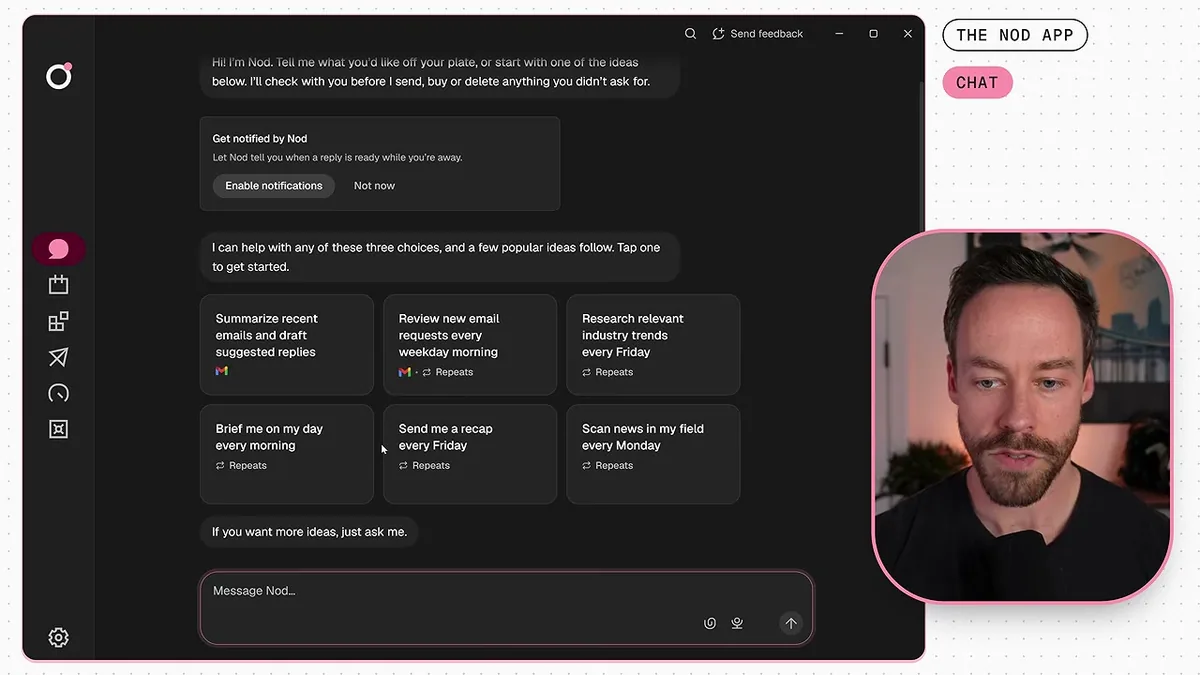
Down the left side, there are five more tabs:
- Scheduled. Automations that run on a timer. Tell Nod what you want in plain words, one question at a time, and it shows you the schedule as JSON for you to approve. Then it lives in this tab, where you can edit it, ask Nod about it, or run it now.
- Apps. Connectors, one click each. Gmail, Google Calendar, Slack, Notion, QuickBooks, LinkedIn, Supabase, and more. Connect as many accounts as you want.
- Channels. How you reach Nod when you are away from your computer. Telegram is a bot you create and scan, WhatsApp works the same way. No phone app yet, so this is the remote control.
- Usage. A per-request breakdown of tokens in and tokens out, at a very granular level. Useful if you are paying per token and want to know where the money goes.
- Vault. Where passwords, logins, and credit cards live. Import them here and the model never touches them.
Best use cases
Nod does the same jobs as the other personal agents. The differentiator is not the job list, it is the open model choice and the vault. Three jobs show it off best:
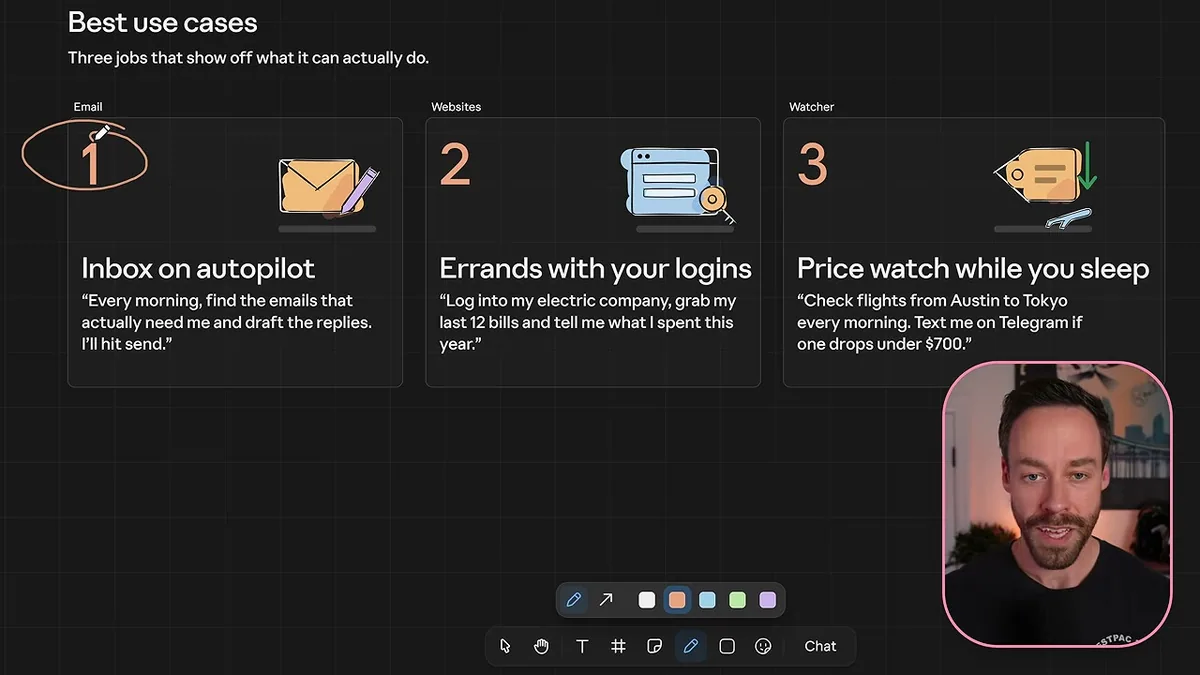
- Inbox on autopilot. Every morning, find the emails that actually need you and draft the replies in your voice. You hit send. This is the easiest win, and the one the app suggests first.
- Errands that need your logins. Log into the electric company, grab the last 12 bills, and tell me what I spent this year. The vault makes this safe, because the password never reaches the model.
- Price watch while you sleep. Check flights from Austin to Tokyo every morning and text me on Telegram if one drops under $700. Set it once as a scheduled task and it watches for you.
Beyond those three, the same pattern covers a morning brief from your inbox and calendar, chasing unpaid invoices, prepping call briefs from Gmail and Calendar, cancelling free trials before they charge, and scanning news in your field every Monday.
If your team wants an agent that does this kind of work inside your business systems, that is what we build at CodeMyPixel: read how our AI agent development services work, or start from our guide on how to build an AI agent.
Nod pros and cons
| Pros | Cons |
|---|---|
| Free app, open source (Apache 2.0) | Research preview: rough edges, breaking changes |
| Any model, including local and free | Only on while your PC is on, unless you use a VPS or an always-on machine |
| Your data stays on your machine | No phone app yet; remote access is Telegram or WhatsApp |
| Vault keeps passwords away from the model | Windows needs WSL 2; no Linux desktop app yet |
| Full control: fork it, change it, self-host it | Aimed at technical users; most people will never open GitHub |
| Per-token usage breakdown | Model costs are yours: API bill, ChatGPT plan, or local compute |
Who should try Nod, and who should skip it
Try it if you like the idea of a personal agent but want the flexibility of open source, you already pay for ChatGPT Plus or Pro, you care about keeping data and passwords on your own machine, or you want to run a local model and pay nothing per request.
Skip it for now if you want a polished product that just works, you need it to keep working while your laptop is closed and you will not run a VPS or a Mac Mini, or you want a phone app instead of a Telegram bot. In that case, Dots or Duet is the more finished choice, and you pay for that finish with a locked model and a monthly plan.
Verdict
Nod is not a copycat. It does the same job as Dots, Duet, Grokbot, and Muse, but it changes the deal: your computer instead of their cloud, your model instead of theirs, your code to change instead of a black box. The price of that freedom is a computer that stays on and a product that is still a research preview.
If you are technical, curious, and happy to tinker, Nod is the most interesting personal agent launch of the last three months. Download it at nod.n8n.io, try the inbox autopilot first, and see if an agent on your own machine earns its place.
FAQ
Is n8n Nod really free?
Yes. The app is free and open source under Apache 2.0. You pay your model provider for what Nod uses: an API key, a ChatGPT Plus or Pro plan, or a local model on your own computer, which costs nothing per request.
Is Nod the same as n8n?
No. Nod is a standalone desktop app from n8n Labs, a new team inside n8n. It is not the n8n workflow platform, it is not the n8n AI Assistant, and you do not need an n8n account to use it.
Does Nod work if my computer is off?
No, not by default. Nod runs on your computer, so when the computer is off, Nod is off. To keep it always on, run it on a computer that never shuts down, like a Mac Mini, or host it on a VPS or Linux server.
Which model should I use with Nod?
If you already pay for ChatGPT Plus or Pro, connect that first: it draws from your subscription. If you want the cheapest path, run a local model through Ollama. If you want the widest choice, use OpenRouter. n8n's own test had GPT-6.1 Sol and Claude Opus 5.5 score best, but that was the maker's own evaluation, not an independent benchmark.
Is my password safe with Nod?
Passwords and credit cards go into the vault, which the language model never touches. When a site needs a login, the Linux VM on your computer enters the password. The model never sees it, and nothing is sent to the cloud.
Where do I download Nod?
From nod.n8n.io for Mac or Windows, or read the code at github.com/n8n-io/nod. Docs are at nod.n8n.io/docs.
Sources
- Chase AI, n8n Just Released a FREE + Open Source Version of Claude Duet, Grokbot, Dots, & Muse (Nov 14, 2026)
- n8n Blog, Meet Nod: a standalone personal agent from n8n Labs that runs on your computer (Nov 10, 2026)
- Nod on GitHub: github.com/n8n-io/nod
- Download and docs: nod.n8n.io and nod.n8n.io/docs
- n8n Nod
- personal AI agent
- open source AI
- AI agents
- n8n