IA10 min de lecturePar JH Akash
Kling 4.0 Explained: 30-Second AI Video, Keyframes, and Omni Reference
Kuaishou launched Kling 4.0 on October 15, 2026: 30-second single-pass AI video, up to 10 keyframes, and Omni Reference with up to 15 assets. Here are the specs, the observed costs, and who it is really for.
What happened
Kuaishou launched Kling 4.0, the next generation of its Kling AI video model, on October 15, 2026. The announcement frames the upgrade around three priorities: realism, control, and professional quality.
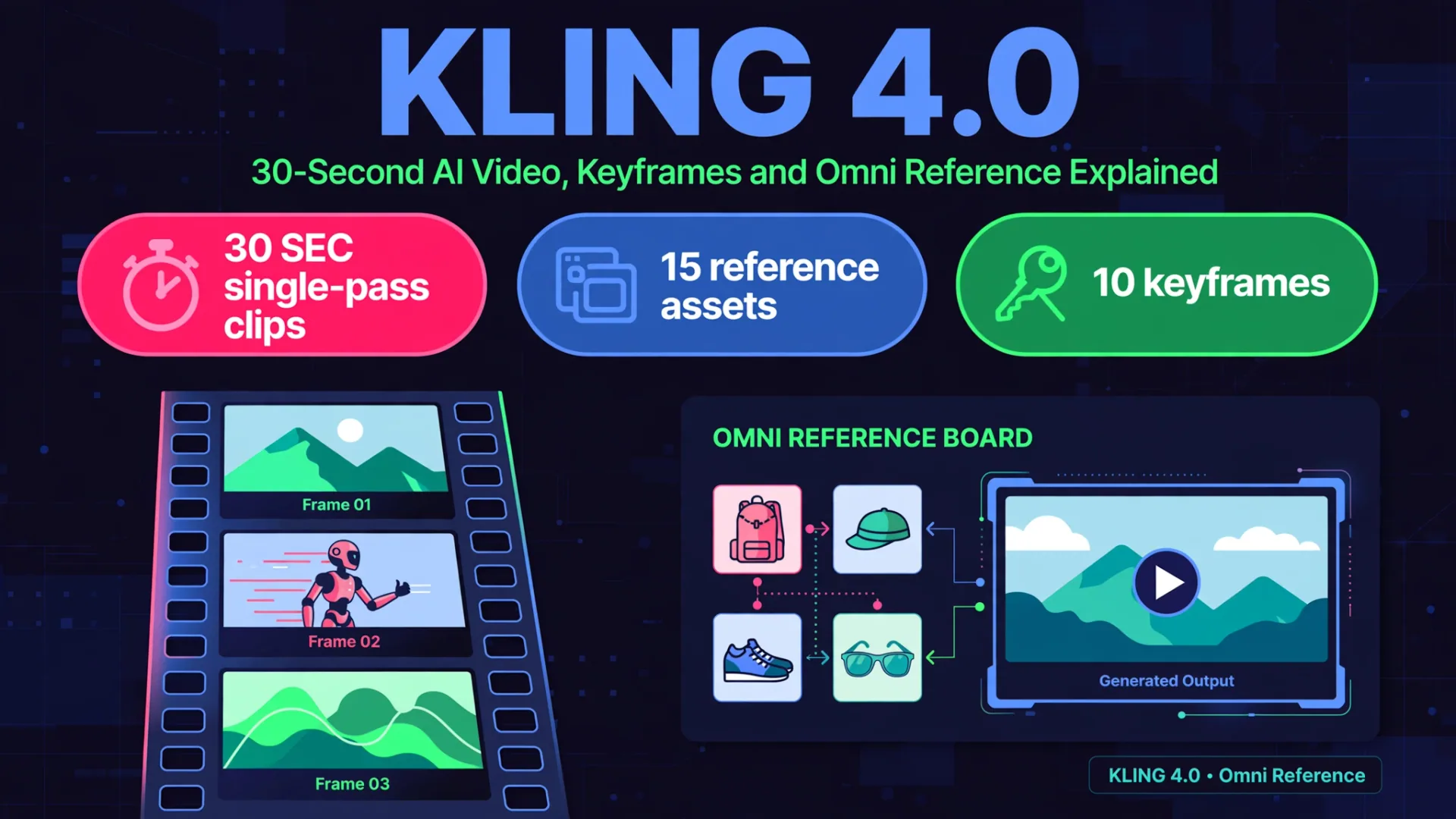
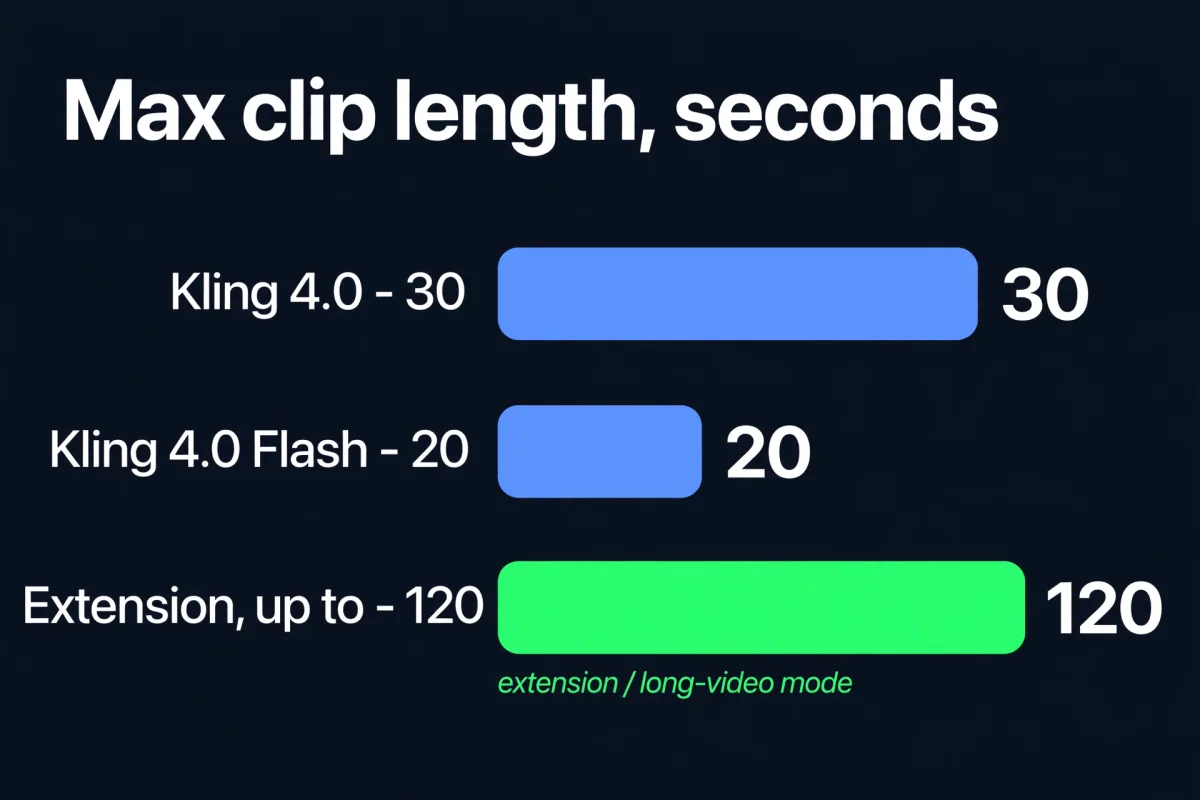
The headline change is length with control. Kling 4.0 generates up to 30 seconds of video in a single pass, so a full beat with a beginning, movement, and payoff can live in one clip instead of being stitched together from fragments. It also adds Omni Reference, which lets one generation draw on up to 15 reference assets, plus up to 10 keyframes to pin down the key visual moments of a shot.
This is a launch breakdown, not a benchmark shootout. AI video has no public leaderboard like the ones for language models, so the honest comparison here is specs, observed costs, and hands-on reports from launch day.
Quick verdict
| Question | Answer |
|---|---|
| What is it? | Kling 4.0, Kuaishou's flagship AI video generation model |
| Launched | October 15, 2026 |
| Biggest upgrade | 30-second single-pass clips with keyframe and reference control |
| Best for | Product shots, short dramas, ads, and any scene where subject, camera, and environment must stay connected |
| Skip it if | You only need a short social clip and will throw away most of the generated motion |
| Pricing | Official 4.0 pricing not published at launch; launch-day credit costs observed below |
What is new in Kling 4.0
30-second single-pass clips
Earlier AI video tools trained creators to think in fragments: generate a few seconds, keep one useful moment, repair continuity in the edit. A 30-second native clip changes the planning problem. You can brief a complete beat, a character running through a street, colliding with a fruit stand, and staying under a following camera, and judge the whole moving scene instead of a still frame.
Kling 4.0 also improves its understanding of camera movement, including push-ins, pull-outs, pans, trucking shots, tracking shots, and orbit shots. Prompt input length now reaches 8,000 tokens, so a shot brief can carry far more direction than before. The model also expands prompts with what Kuaishou calls a director's eye.
Omni Reference: up to 15 assets in one generation
Omni Reference is the control story of this release. A single generation can combine images, videos, subjects, and voices, up to 15 references in total, including up to 10 images, 5 videos, and 7 subjects. Supported reference types include subject images, three-view character sheets, grid images, storyboards, wireframes, and video inputs for character performance, action, camera movement, and narrative pacing. White-model videos and depth-map videos can also serve as references.
The practical payoff is continuity: lock a character's face across shots, match a product's exact color from a photo, or carry a lighting setup from one scene into the next, without re-describing those details in every prompt. Creators can also take the pacing and composition of a reference video and swap in their own products, characters, and assets, which is aimed squarely at product ads, fashion and beauty content, and consumer electronics spots.
One warning from early testers: giving each reference a clear job works, but throwing unrelated images together produces ambiguity, not control. Assign one reference to setting, one to character, one to camera movement, and one to the emotional change.
10 keyframes
Kling 4.0 supports up to 10 keyframe inputs. Keyframes let you set the key visual moments, character states, scene changes, and story beats, so content progresses in the intended direction instead of drifting. Keyframes do not remove the need for directing. They make direction more worthwhile, because the frames between keyframes still rely on the model's interpolation. Keep camera angles and lighting compatible from frame to frame, and test a simple sequence before stacking on more references.
Extension and long video
The video extension feature will soon support multiple extensions of up to two minutes, according to Kuaishou. Early reports also describe an experimental long-video mode producing up to 120 seconds at 1080p. Treat both as roadmap, not delivered features, until they appear in the interface for your account.
Picture quality: 10-bit HDR, 4K, and 21:9
Kuaishou lists output of up to 10-bit HDR, plus support for 4K, 1080p, and the 21:9 ultrawide format. In high-contrast scenes such as backlit shots, night scenes, and neon-lit settings, the extra color depth is meant to preserve more detail in highlights and shadows and leave more room for color grading in post.
One honest caveat: a launch-day tester could not find the 10-bit 4K HDR option in the interface he used. So treat 4K HDR as rolling out rather than confirmed live for everyone. If your delivery requires 4K, check the output options for your account before generating, and confirm whether the delivered file is native output or an upscale.
Built for production workflows
Two workflow additions matter for teams. Kling 4.0 has been integrated with Kling MCP and CLI, so creators can reach features like Omni Reference and keyframe-to-video generation through AI agents. Model capabilities will also soon be available to enterprise customers and developers through API access.
Kuaishou also points to proof in advertising: at the Cannes Lions festival, where AI entered the judging framework for the first time, two works created with Kling AI won Gold Lions.
Kling 4.0 vs Kling 4.0 Flash vs Kling 3.0
| Spec | Kling 4.0 | Kling 4.0 Flash | Kling 3.0 (previous gen) |
|---|---|---|---|
| Max single-pass clip | 30 seconds | 20 seconds | Shorter clips, typically 5 to 10 seconds |
| Resolution | Up to 1080p, 4K listed as rolling out | Up to 720p | Up to 1080p |
| Keyframes | Up to 10 | Limited controls reported | No keyframe system |
| Omni Reference | Up to 15 assets | Omni-style references, tighter limits | Basic reference images |
| Prompt length | Up to 8,000 tokens | Shorter | Shorter |
| Extension | Up to 2 minutes promised | Not the focus | Basic extension |
| Built for | Finishing passes, continuity-heavy shots | Fast exploration and iteration | Everyday short clips |
Flash is the fast, cheaper tier for exploring a shot. The full model is the finishing pass for shots where continuity, action, or reference control justifies the spend. Early reports describe Flash as opening in limited early access for Ultra Yearly subscribers, so availability may vary by account.
How it stacks up against Veo and Runway
There is no shared benchmark for AI video quality, so this comparison is about lanes, not scores.
- Google Veo 3.1 is the consistency pick, with native 4K output inside the Google ecosystem. Pick it when output consistency and Google tooling matter most.
- Runway Gen-4 leads on the editing suite and a multi-model bundle that includes third-party models. Pick it when editing controls and a bundled workflow matter most.
- Kling 4.0 leads on motion quality, long single-pass clips, and reference-driven control. Pick it when the shot needs a sustained relationship between subject, camera, and environment.
- OpenAI Sora is reported discontinued, with its API returning errors in late September 2026. If you were waiting on Sora, Kling 4.0 and Veo 3.1 are the realistic alternatives.
Different strengths, different tools. No single model wins every lane, and a 30-second clip length does not make one model better at everything.
Pricing: what we know and what we do not
Kuaishou has not published official Kling 4.0 pricing at launch. What exists so far is one reviewer's observed launch-day credit costs, plus the previous generation's pricing for context. Treat the observed numbers as a snapshot, not a rate card.
| Item | What we know |
|---|---|
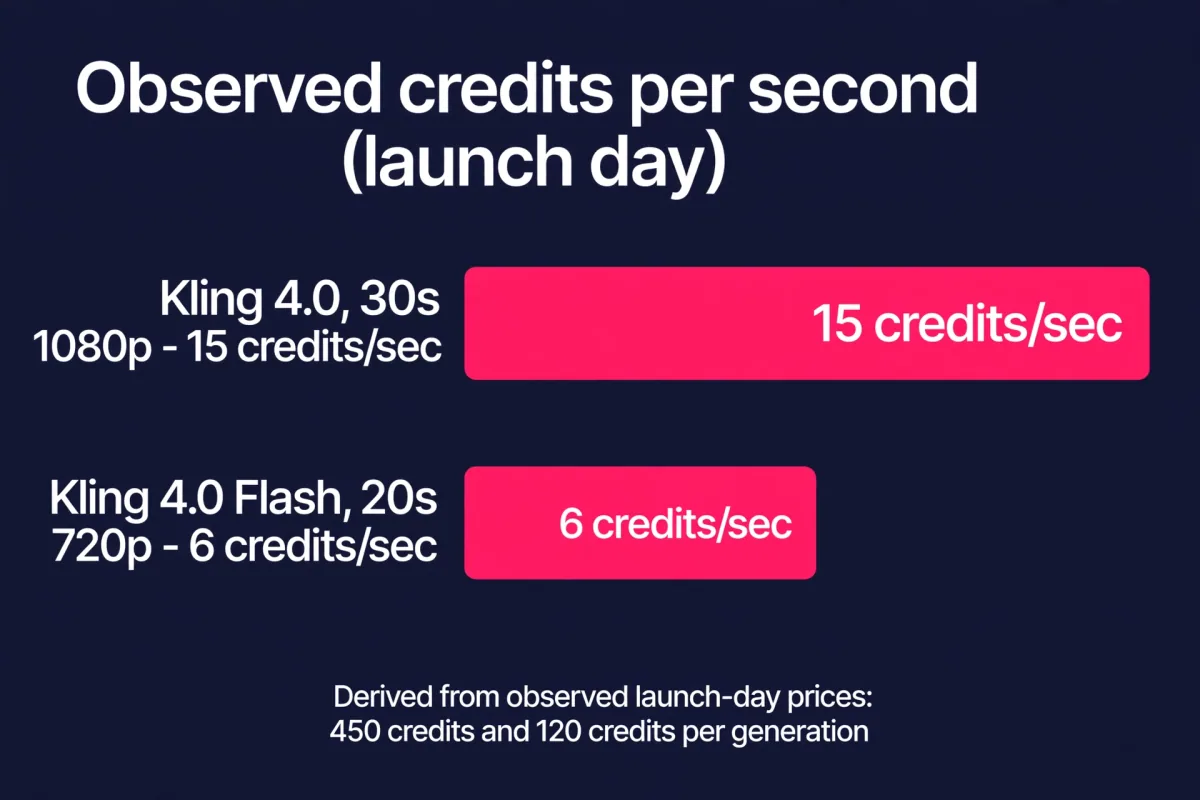
| Kling 4.0, 30-second 1080p generation | 450 credits, observed on launch day by one tester |
| Kling 4.0 Flash, 20-second 720p generation | 120 credits, observed on launch day by one tester |
| Derived cost per second | 15 credits per second (full model) vs 6 credits per second (Flash) |
| Official 4.0 price list | Not published at launch |
| Previous-gen free tier (Kling 3.0 era) | 66 free credits per day, watermarked output, no commercial rights |
The derived per-second math is useful but not a like-for-like comparison: the two observed generations differ in duration and resolution. The right metric is not cost per generation. It is the cost of arriving at an edit-worthy shot, including the failed attempts. Check Kling's live plan before budgeting a project, because launch-week credit costs can change.
How to use Kling 4.0 well
- Write the shot as a brief, not a sentence. List what must move, what must stay consistent, what the camera must do, and which reference carries each instruction.
- Start in Flash. Explore the idea with the faster, cheaper tier. Learn what the shot needs before spending on the full model.
- Give every reference a job. Setting, character, composition or camera movement, and emotional change. Test a simple sequence first, then add references.
- Review for physical logic, not pretty stills. Watch the whole clip for cuts, continuity, and cause and effect. A 30-second duration does not guarantee an uninterrupted take.
- Plan for several attempts per finished clip. Budget for iteration, not one-shots. The first generation is rarely the one you ship.
- Check the output options before you pay. Confirm resolution, HDR, and extension support for your account, especially if delivery requires 4K.
Which to pick
- Product ads and e-commerce: Kling 4.0. Reference a real product photo, lock its color and shape, and move it through a real-looking space.
- Short dramas and narrative scenes: Kling 4.0. Keyframes plus extension paths give multi-part storylines room to unfold.
- Fast social experiments: Kling 4.0 Flash. Explore cheaply, then finish the winners on the full model.
- Broadcast-grade delivery: Wait and verify. Confirm 4K HDR is live on your account before promising it to a client.
- Building a product on video generation: Kling 4.0 via MCP, CLI, or the coming API. Reference-driven control is the feature that turns generation into a pipeline.
FAQ
When did Kling 4.0 launch?
Kuaishou announced on October 16, 2026 that Kling 4.0 officially launched on October 15, 2026. Kling 4.0 Flash opened in limited early access around the same time, according to early reports.
How long are Kling 4.0 clips?
Up to 30 seconds in a single pass on the full model, and up to 20 seconds on Kling 4.0 Flash. Extension features are promised to reach up to two minutes, and early reports describe an experimental long-video mode up to 120 seconds at 1080p.
What is Omni Reference in Kling 4.0?
Omni Reference lets one generation combine up to 15 reference assets, including up to 10 images, 5 videos, and 7 subjects. References can cover character, setting, camera movement, pacing, and audio, so the output stays close to the creator's intent.
How many keyframes does Kling 4.0 support?
Up to 10 keyframe inputs. Keyframes pin down the key visual moments, character states, scene changes, and story beats of a shot.
How much does Kling 4.0 cost?
Official Kling 4.0 pricing had not been published at launch. One tester observed 450 credits for a 30-second 1080p generation and 120 credits for a 20-second 720p Flash generation. Check Kling's live plan before budgeting a project.
Can Kling 4.0 generate 4K video?
Kuaishou lists 4K and 10-bit HDR support, but a launch-day tester could not find the 4K HDR option in the interface he used. Treat 4K as rolling out, and confirm the output options on your account before generating.
Is Kling 4.0 better than Veo 3.1 or Runway Gen-4?
There is no shared benchmark that answers that question. Veo 3.1 is the consistency pick inside the Google ecosystem, Runway leads on editing and a multi-model bundle, and Kling 4.0 leads on long single-pass clips, motion quality, and reference-driven control. Pick by the lane your shot needs.
Can developers use Kling 4.0 in their own products?
Kling 4.0 works through Kling MCP and CLI today, and Kuaishou says API access for enterprise customers and developers is coming soon.
Bottom line
Kling 4.0 moves AI video from generation toward direction. The 30-second clip is the headline, but the real shift is control: 15 references, 10 keyframes, and an 8,000-token brief give creators a way to direct a shot instead of rolling the dice on it. The caveats are real too. Official pricing is unpublished, 4K HDR is still rolling out, and extension to two minutes is promised rather than delivered. Test it on a real shot, start in Flash, and judge the moving scene, not the still frame.
Want an AI video pipeline or an AI agent built around your own content workflow? CodeMyPixel builds custom AI agents and AI tools for growing teams. See how AI video fits a real production workflow in our breakdown of Higgsfield Genjutsu, compare image models in Nano Banana 2.1 vs GPT Image 2.5, and compare voice models in Grok Voice 3.0 vs GPT-Live-1 vs Gemini Live.
Sources: Kuaishou press release via GlobeNewswire, October 16, 2026; launch-day hands-on review on DEV, October 16, 2026; Kling AI pricing context via CloudZero.
- Kling 4.0
- Kling AI
- AI Video
- Video Generation
- Kuaishou