AI8 min readBy JH Akash
Gemini Omni 1.2 Flash vs Seedance 2.5: 15-Second AI Video, Price and Quality Compared
Google DeepMind took Gemini Omni 1.2 Flash to general availability on Nov 5, 2026: 15-second native clips, multi-turn conversational edits, and $0.07 per second of 720p video, about 30% cheaper than 1.1. Here is how it stacks up against ByteDance Seedance 2.5.
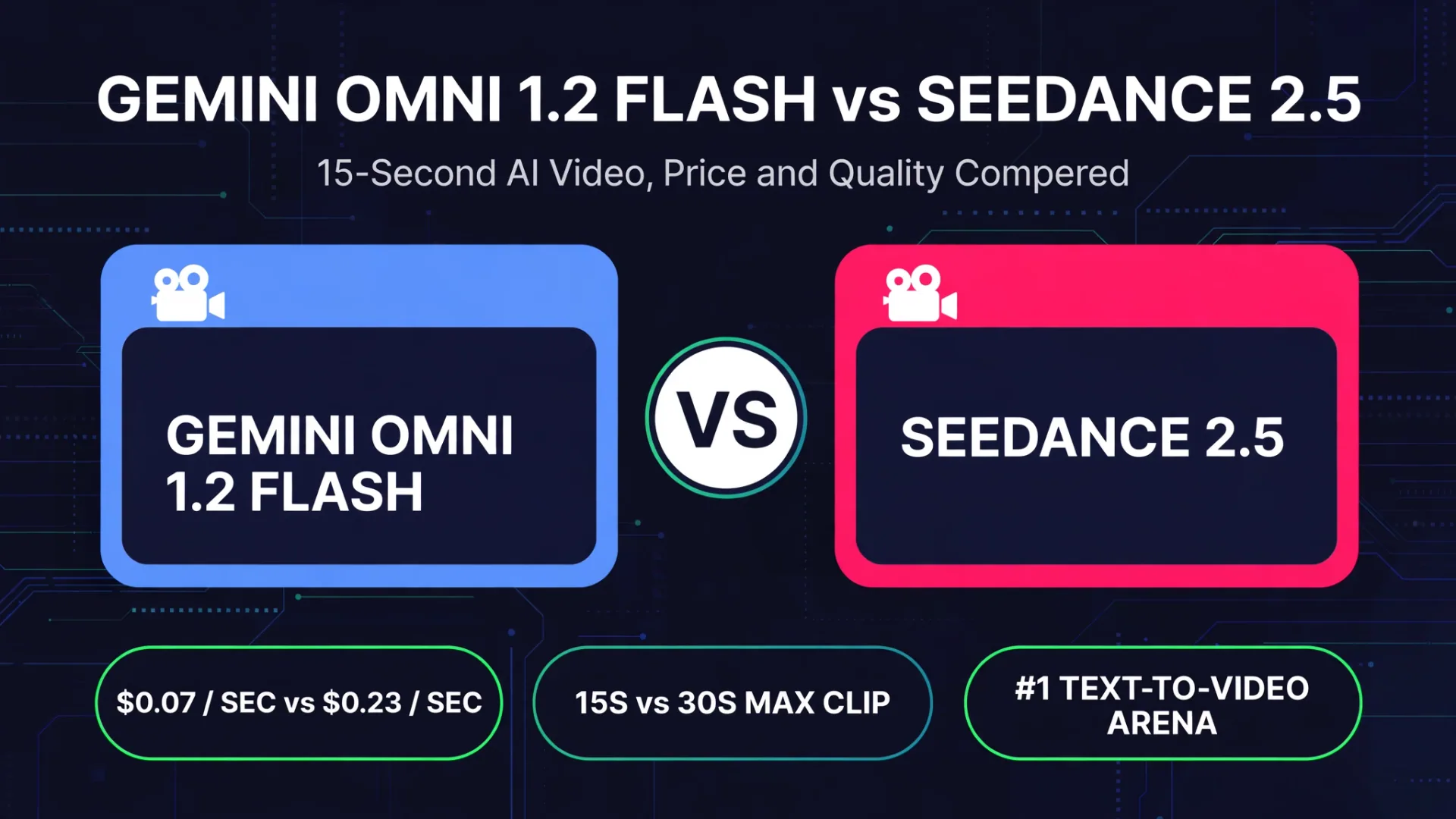
Google DeepMind took Gemini Omni 1.2 Flash to general availability on November 5, 2026, and it changes the math of AI video. Native clips now run up to 15 seconds, up from 10 on Omni 1.1 Flash, and the price fell about 30% to $0.07 per second of 720p video. The same week, early leaderboard reports put it at number one for text-to-video and image-to-video. Its sharpest rival on price and quality is ByteDance Seedance 2.5, which makes longer single takes but costs roughly three times as much per second. This post breaks down what changed, what each model costs, and which one fits your workflow.
Quick verdict
| Gemini Omni 1.2 Flash | Seedance 2.5 | |
|---|---|---|
| Maker | Google DeepMind | ByteDance Seed |
| Max single clip | 15 seconds | 30 seconds |
| Price per second (720p) | $0.07 | About $0.23 |
| Cost of one 15-second 720p clip | About $1.04 | About $3.45 to $4.66 |
| Conversational multi-turn editing | Yes, via the Interactions API | Limited |
| Early Arena ranking (reported Nov 7) | #1 text-to-video, #1 image-to-video | #2, behind Omni 1.2 in the same early reports |
| Open weights | No | No |
| Best for | Iterative editing, ads, social clips, prototyping | Long cinematic single takes, high-end photorealism |
Neither model is a universal winner. Omni 1.2 Flash is cheaper per second and built for editing in conversation. Seedance 2.5 gives you twice the uninterrupted clip length in one generation. Pick by workflow, not by headline.
What changed in Gemini Omni 1.2 Flash
Omni 1.2 Flash is a multimodal video model: it takes text, image, audio and video inputs and generates or edits video with native sound. The headline changes over 1.1 are longer clips, cheaper output, and better reference following.
- Clip length: 3 to 15 seconds in one-second steps, with 10 seconds as the default. Omni 1.1 topped out at 10 seconds, so the new maximum is 50% longer.
- Multi-turn editing: you can keep editing the same generated clip in conversation, changing background, lighting or camera angle without regenerating from scratch. The Gemini API does this through stateful interactions, using a previous interaction ID.
- Extensions: a clip can be extended 3 to 10 seconds per turn, up to 30 seconds total.
- References: up to six reference images, including up to three per character for two characters. For 3 to 10 second generations, up to three short reference videos are allowed; for 11 to 15 second generations, only one.
- Resolution: native 360p or 720p, with 1080p and 4K delivered by upscaling. Aspect ratios are 16:9 and 9:16.
- First and last frame interpolation: up to 10 seconds, so a shot that must start and end on exact frames still stays within 10 seconds.
- Watermark: every generated video carries an invisible SynthID watermark.
- Availability: generally available on the paid Gemini API tier and Google Cloud, plus rolling out in Google AI Studio, Flow, Google Vids and the Gemini app for Google AI Ultra subscribers. There is no free API tier.
Google is candid about the limits too: fast sports, rapid script changes and complex physics remain areas for development, and the demos are selected examples, not a promise that every prompt succeeds. The 1.1 alias automatically routes to 1.2 from December 3, 2026, so existing apps will switch behavior without a code change.
Pricing: how much a clip actually costs
Google prices Omni 1.2 Flash at $12.00 per million video output tokens, which works out to about $0.07 per second of 720p video. Omni 1.1 was $17.50 per million tokens, about $0.10 per second. Google describes the cut as 30%; the token rates work out to about 31% lower.
| Output resolution | 10 seconds | 15 seconds | 100 x 15-second clips |
|---|---|---|---|
| 360p native | $0.23 | $0.35 | $34.76 |
| 720p native | $0.70 | $1.04 | $104.26 |
| 1080p upscaled | $1.04 | $1.56 | $156.38 |
| 4K upscaled | $2.09 | $3.13 | $312.77 |
Those figures cover video output only. Input tokens cost $1.50 per million, and text output including thinking costs $9 per million, so a full session with retries and edits costs more than the single-clip number. Seedance 2.5, for comparison, runs about $0.23 per second through BytePlus, and up to about $0.47 per second on some secondary hosts. A 15-second clip there costs roughly $3.45 to $4.66, about 3.3 times the Omni 1.2 price.
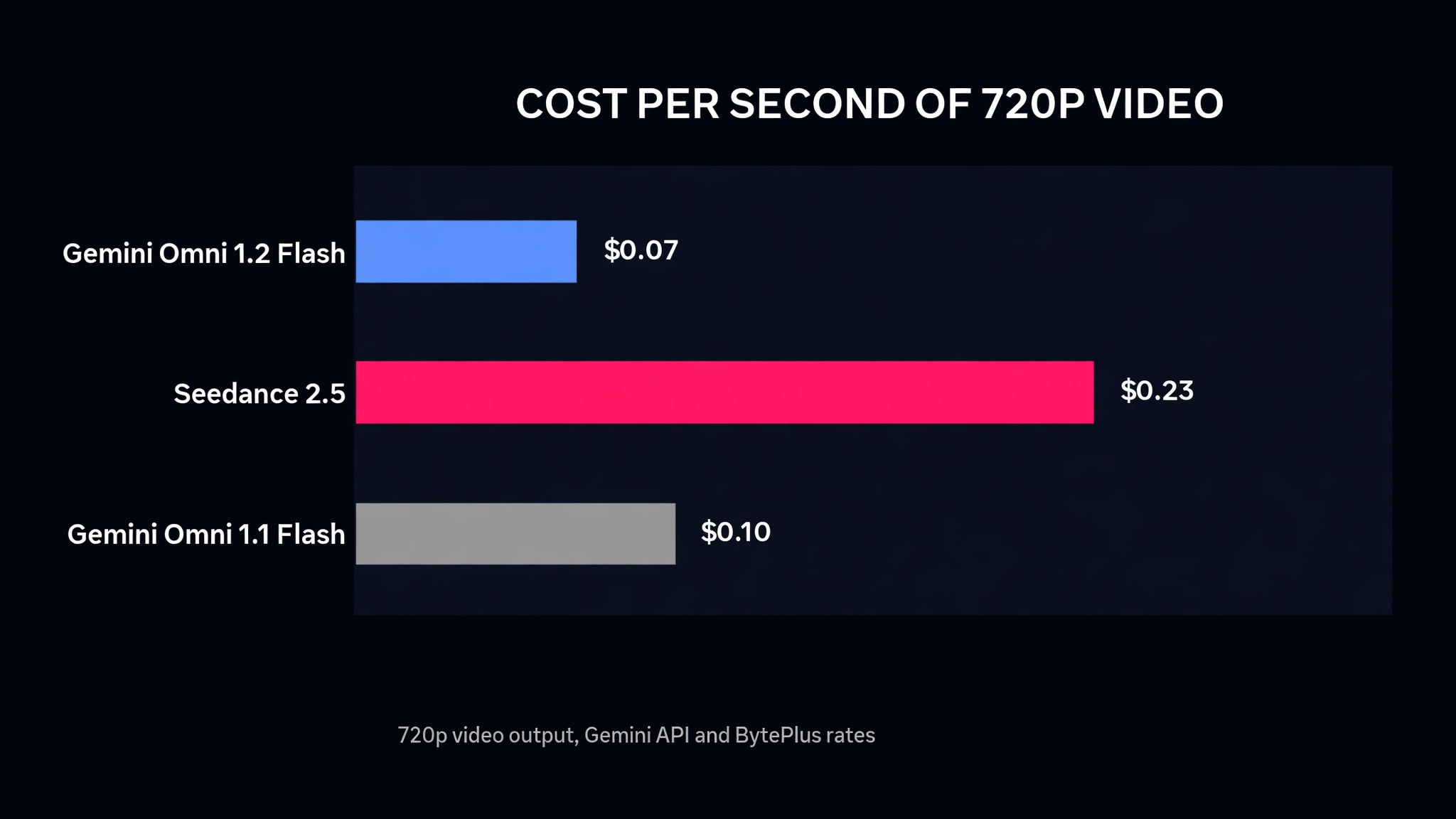
The practical takeaway: a 15-second 720p clip on Omni 1.2 costs about the same as a 10-second clip did on Omni 1.1, roughly $1.04 against $1.01, while delivering 50% more footage. For teams generating hundreds of clips, that gap compounds fast. Budget by the number of candidate takes a real job needs, not only by the price of the final clip.
Benchmarks: Google-reported preference rates
Google has not published benchmark scores for 1.2, and no parameter count is public. What Google did publish is a set of side-by-side human preference rates comparing 1.2 with 1.1. These are vendor-reported preference rates, not accuracy scores and not competitor rankings, and Google omits prompt counts, rater details and confidence intervals, so treat them as directional.
| Task | Metric | Omni 1.2 | Omni 1.1 | Gap |
|---|---|---|---|---|
| Text to video | Visual Consistency | 62% | 38% | 24 points |
| Text to video | Prompt Adherence | 55% | 45% | 10 points |
| Text to video | Visual Quality | 54% | 46% | 8 points |
| Editing | Instruction Editing | 57% | 43% | 14 points |
| Editing | Edit Instruction Adherence | 54% | 46% | 8 points |
| Image to video | Overall Preference | 59% | 41% | 18 points |
| Image to video | Reference Identity Consistency | 60% | 40% | 20 points |
| Reference to video | Overall Preference | 63% | 37% | 26 points |
| Reference to video | Multi-Reference Identity Consistency | 63% | 37% | 26 points |
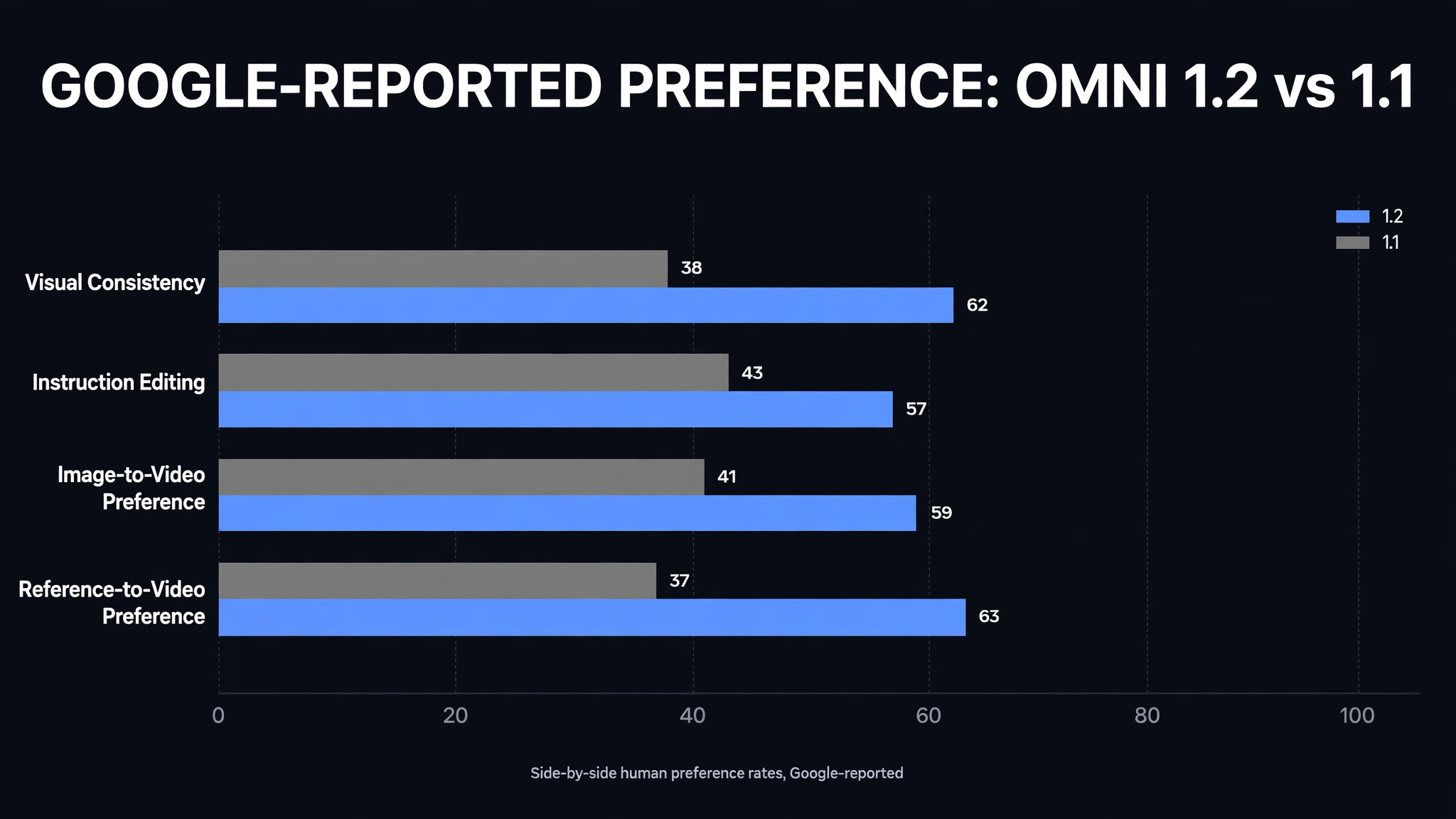
The biggest reported jumps are in visual consistency and reference handling, which matches what the model is for: keeping characters and objects stable across a longer clip and across edit turns. Early Arena-style leaderboard reports read on November 7 placed Omni 1.2 Flash first in text-to-video and image-to-video and third in video editing, ahead of Seedance 2.5 and others. Those rankings move as votes come in, and a check on November 5 had not yet shown a 1.2 result, so treat the leaderboard as an early signal, not a settled verdict.
Omni 1.2 Flash vs Seedance 2.5: where each one wins
Choose Omni 1.2 Flash if you iterate. The conversational editing loop is the real product here: generate a clip, ask for a different background or a tighter camera move, and keep the rest of the shot intact. At $0.07 per second, failed takes are cheap, and the 15-second ceiling covers most ad and social formats. It also fits teams already on Google Cloud, since it runs in the Gemini API, Vertex AI, Flow and Google Vids.
Choose Seedance 2.5 if you need one long, continuous, cinematic take. Thirty seconds in a single generation is double the Omni ceiling, and its photorealism is its strongest card. You pay for it: roughly $3.45 or more for the same 15 seconds Omni 1.2 makes for about $1.04.
Watch out for the fine print on both sides. Omni 1.2 has no free API tier, uploaded audio references and voice editing are not supported in the current Gemini API, and in the EEA, Switzerland and the UK, uploading video for editing or extension is unavailable. Seedance pricing varies by host, so the $0.23 per second figure is the BytePlus rate, not a universal one.
Which to pick
For most marketing, product and social video work, Omni 1.2 Flash is the practical pick right now: cheaper per second, longer clips than its predecessor, and an edit-in-conversation workflow that matches how real teams revise. For a single cinematic hero shot where continuity over 30 seconds matters more than cost, Seedance 2.5 still holds the edge. Run your own prompts on both before committing a budget, because the reported preference rates are Google's own, and the leaderboard is still early.
If you are building video generation into a product or an internal workflow, the model choice is only half the job. The other half is the pipeline around it: prompt templates, asset storage, review loops and cost controls. That is the kind of system we build at CodeMyPixel. See our AI agent development services and how teams hire an AI automation agency to put models like this into production.
For more on the week in AI models, read our breakdown of GPT-6 Cyber, OpenAI's security model and Tencent Hy4, the open-weight model with vision and computer use.
FAQ
When was Gemini Omni 1.2 Flash released?
Google DeepMind moved Gemini Omni 1.2 Flash to general availability on November 5, 2026. It is available on the paid Gemini API tier and Google Cloud, and is rolling out in Google AI Studio, Flow, Google Vids and the Gemini app for Google AI Ultra subscribers.
How long can Gemini Omni 1.2 Flash videos be?
Native generations run 3 to 15 seconds in one-second steps, with 10 seconds as the default. Clips can be extended 3 to 10 seconds per turn up to 30 seconds total. First and last frame interpolation is limited to 10 seconds.
How much does Gemini Omni 1.2 Flash cost?
Google charges $12.00 per million video output tokens, about $0.07 per second of 720p video. A 15-second 720p clip costs about $1.04 in video output alone, before input and text output charges. That is about 30% cheaper than Omni 1.1 Flash.
Is Gemini Omni 1.2 Flash better than Seedance 2.5?
It depends on the job. Omni 1.2 Flash is about 3.3 times cheaper per second and supports conversational multi-turn editing, while Seedance 2.5 makes 30-second single takes and is known for high-end photorealism. Early leaderboard reports put Omni 1.2 first in text-to-video and image-to-video, but those rankings shift as votes come in.
Does Gemini Omni 1.2 Flash have a free tier?
No. Google lists no free API tier for this model. It runs on the paid Gemini API tier and Google Cloud, with consumer access through Flow, Google Vids and the Gemini app for AI Ultra subscribers.
Can you edit a video by chatting with Omni 1.2 Flash?
Yes. The model supports multi-turn conversational edits, so you can ask for changes to background, lighting or camera angle on an existing generated clip instead of describing the whole scene again. The Gemini API keeps the interaction state, so save your prompts, references and settings alongside each usable take.
What is the difference between Omni 1.2 Flash and Veo?
Omni Flash is Google's multimodal create-and-edit video line, while Veo is its flagship cinematic generation model. Omni 1.2 Flash focuses on fast, cheap, editable clips with native audio, while Veo targets higher-end single-shot generation. Google positions them as complementary lines, not replacements for each other.
- Gemini Omni 1.2 Flash
- Seedance 2.5
- AI video generation
- Google DeepMind
- AI benchmarks