KI7 Min. LesezeitVon JH Akash
Reverse-Engineering Higgsfield Genjutsu: The Free 11-Step AI Video Workflow
Sirio Berati reverse-engineered Higgsfield's Genjutsu in 12 hours and rebuilt it as a free open-source workflow. Here is every step, explained with diagrams: depth masks, vocal isolation, Seedance 2.5 drafts, and the full 11-step pipeline.
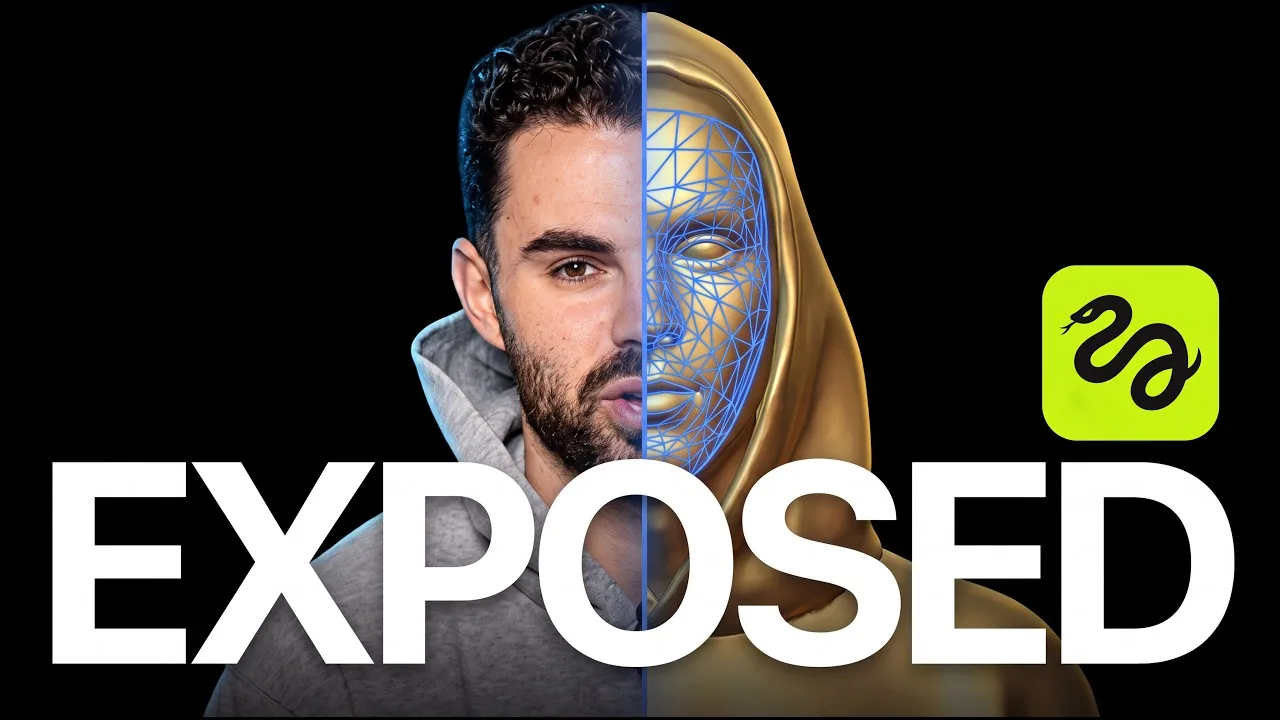
On October 10, 2026, creator Sirio Berati published a video with a bold claim: he had reverse-engineered Higgsfield's Genjutsu feature in 12 hours and rebuilt it from scratch as a free, open-source workflow. The video passed 170,000 views within hours, and the GitHub repo (Genjustsu-Open-Source-Workflow, note the repo's own spelling) collected 400+ stars in days.
This article breaks down everything the video teaches: why video AI blocks your uploads, the exact trick that gets around it, and each of the 11 automated steps. All credit for the research and the workflow goes to Sirio Berati.

Quick verdict
Genjutsu's magic is not a secret model. It is a clever pre-processing pipeline: strip identity (face, music) from a clip, keep the motion, and feed a video generator exactly what it needs. Berati's rebuild does this with Depth Anything, SAM 3, Demucs, and Seedance 2.5, wrapped in an 11-step agent workflow you can run yourself. If you make AI videos with real people or copyrighted audio, this is the most practical breakdown published so far.
What is Higgsfield Genjutsu?
Higgsfield launched Genjutsu as a video transformation tool built around two workflows:
| Workflow | What it keeps | What it changes |
|---|---|---|
| Motion Transfer | Motion, timing, camera movement | Characters, environment, wardrobe, location |
| Object Swap | Most of the existing shot | One selected element (person, product, outfit, background) |
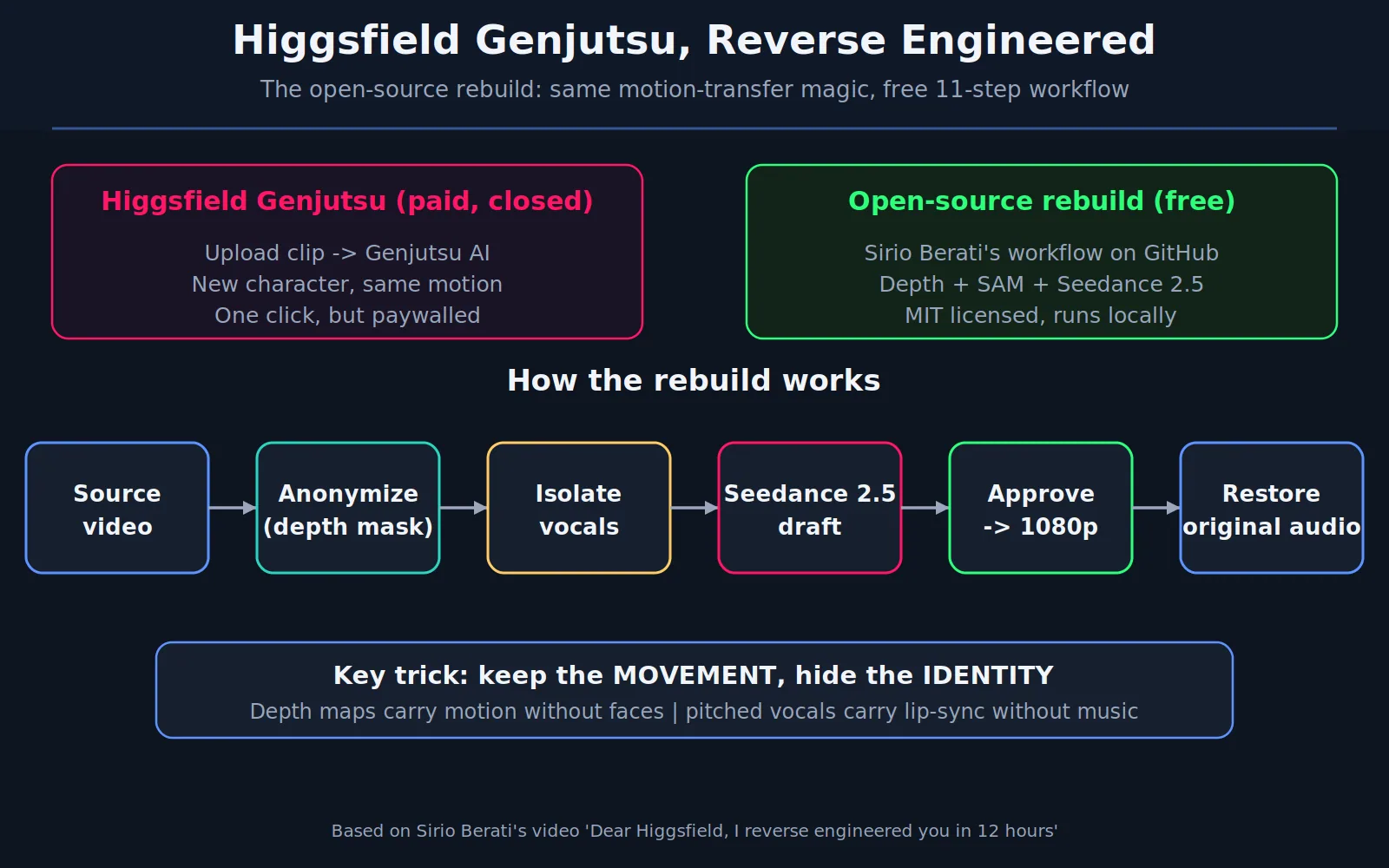
The idea Higgsfield calls "hybrid production": shoot what is easy and cheap in real life, then rebuild the rest with AI. A playground rocker becomes a hovercraft racing through the desert. The catch: Genjutsu is a paid, closed product. Berati's video asks a simple question: what is it actually doing under the hood?
The core thesis
Berati's answer, in his own words: "It is not the AI model. It's the workflow. It's the thinking." His point is that wrapper apps sell you an API workflow, not a model. Once you understand the thinking, you can rebuild the workflow with off-the-shelf models. That is what the rest of the video does.
Why Seedance 2.5 blocks your video
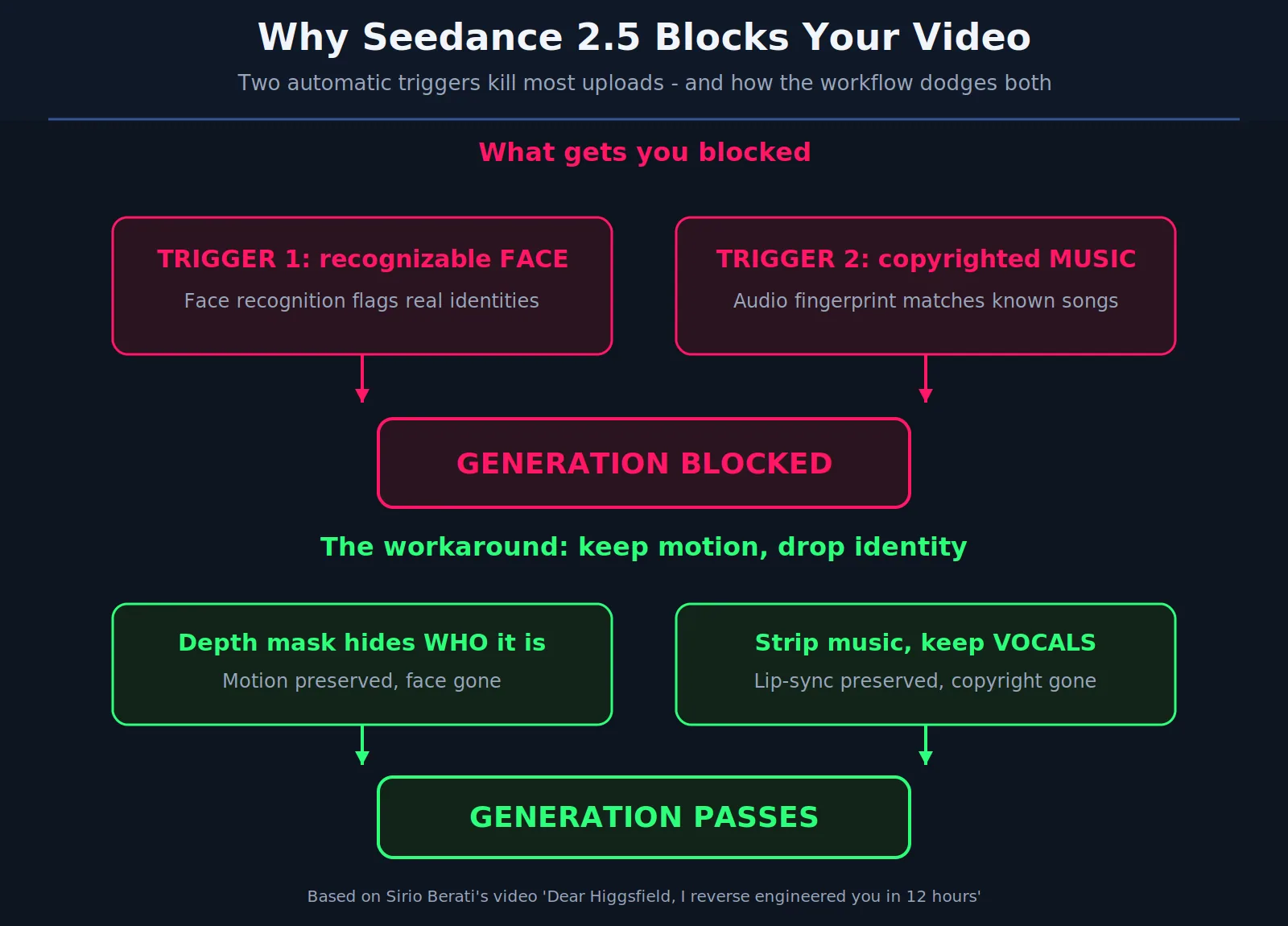
Try uploading a clip of yourself into a movie scene with Seedance 2.5 and it gets blocked. Berati spent 12 to 24 hours testing and found exactly two automatic triggers:
- A recognizable face. Face recognition flags real identities.
- Copyrighted music. Audio fingerprinting matches known songs.
Everything else passes. The key mental model from the video: a clip carries two kinds of information. "Who is in it" (face, voice, music) and "how things move" (motion, timing, lips). The IP filter only cares about the who. So the entire strategy is: keep the movement, hide the identity.
The key insight, visualized
Here is the whole rebuild in one picture: anonymize the video with a depth mask, isolate the vocals, generate with Seedance 2.5, approve, upscale to 1080p, then restore the original audio. Depth maps carry motion without faces. Pitched vocals carry lip-sync without music.
The 11-step automated workflow
The video automates everything into an 11-step agent workflow (you need a Replicate account; Hugging Face works as a backup). Here is each step:
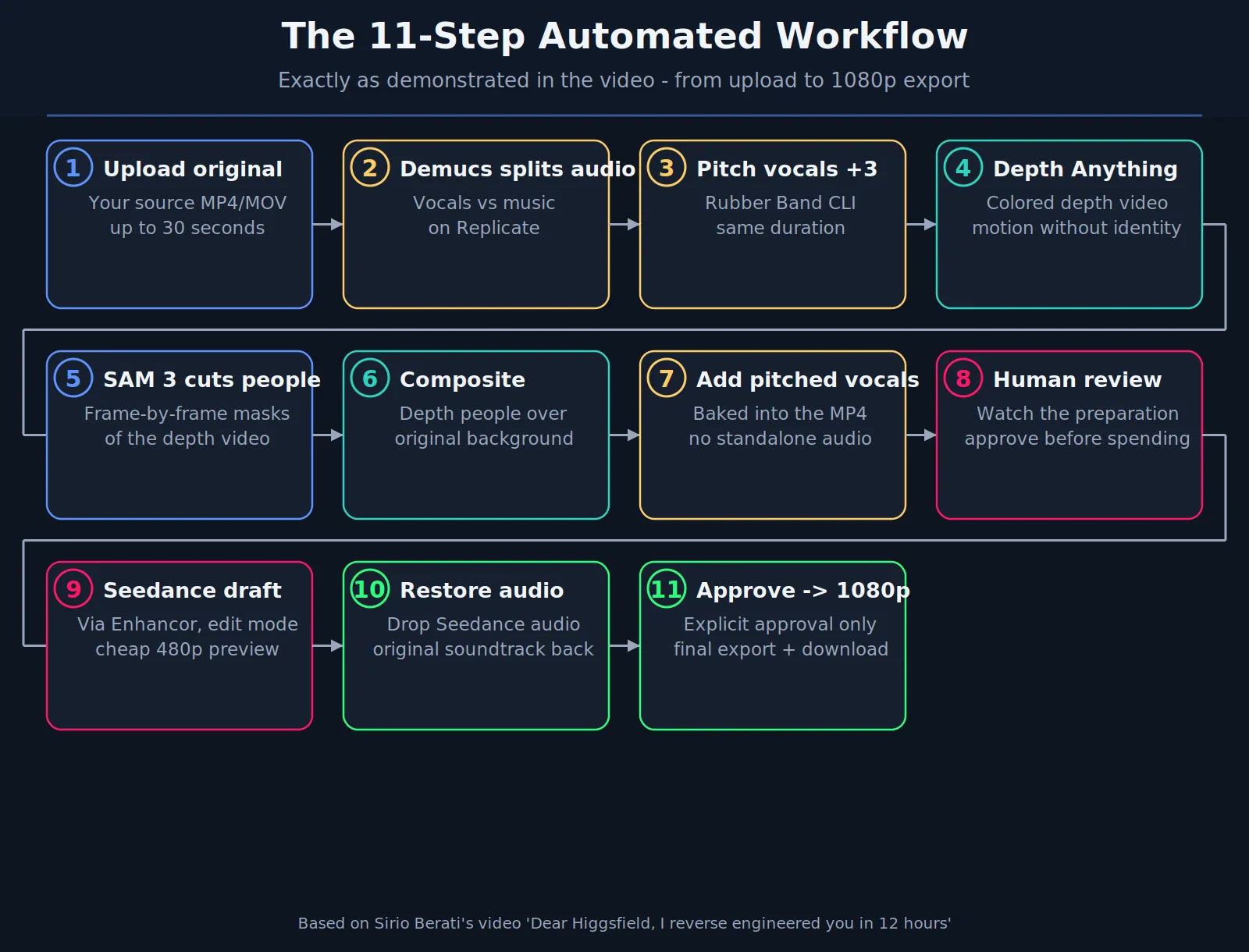
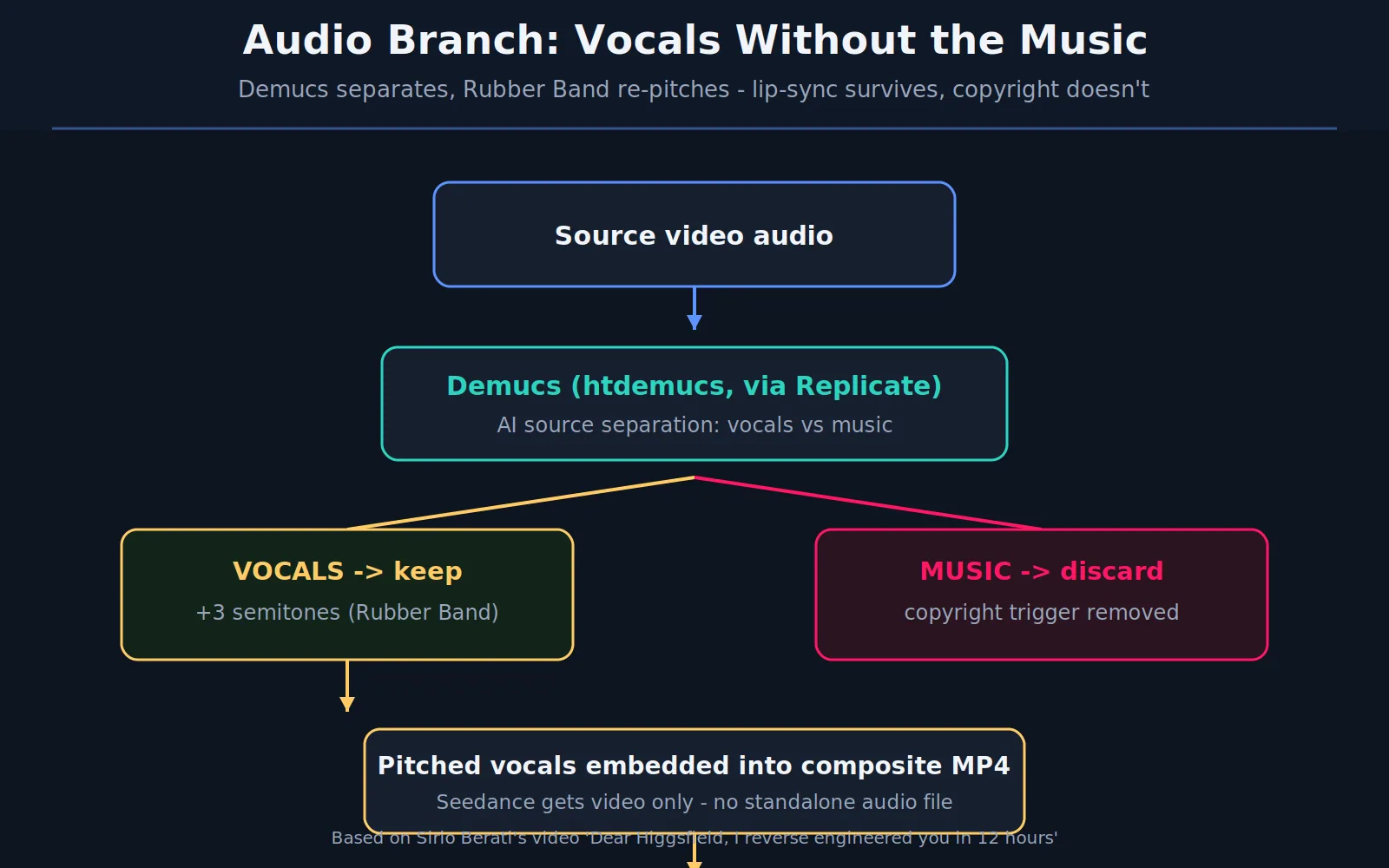
Steps 1 to 3: prepare the audio. Upload the source clip, then Demucs (via Replicate) splits the soundtrack into vocals and music. The vocals get pitched up 3 semitones with Rubber Band, keeping the same duration. The music is discarded.
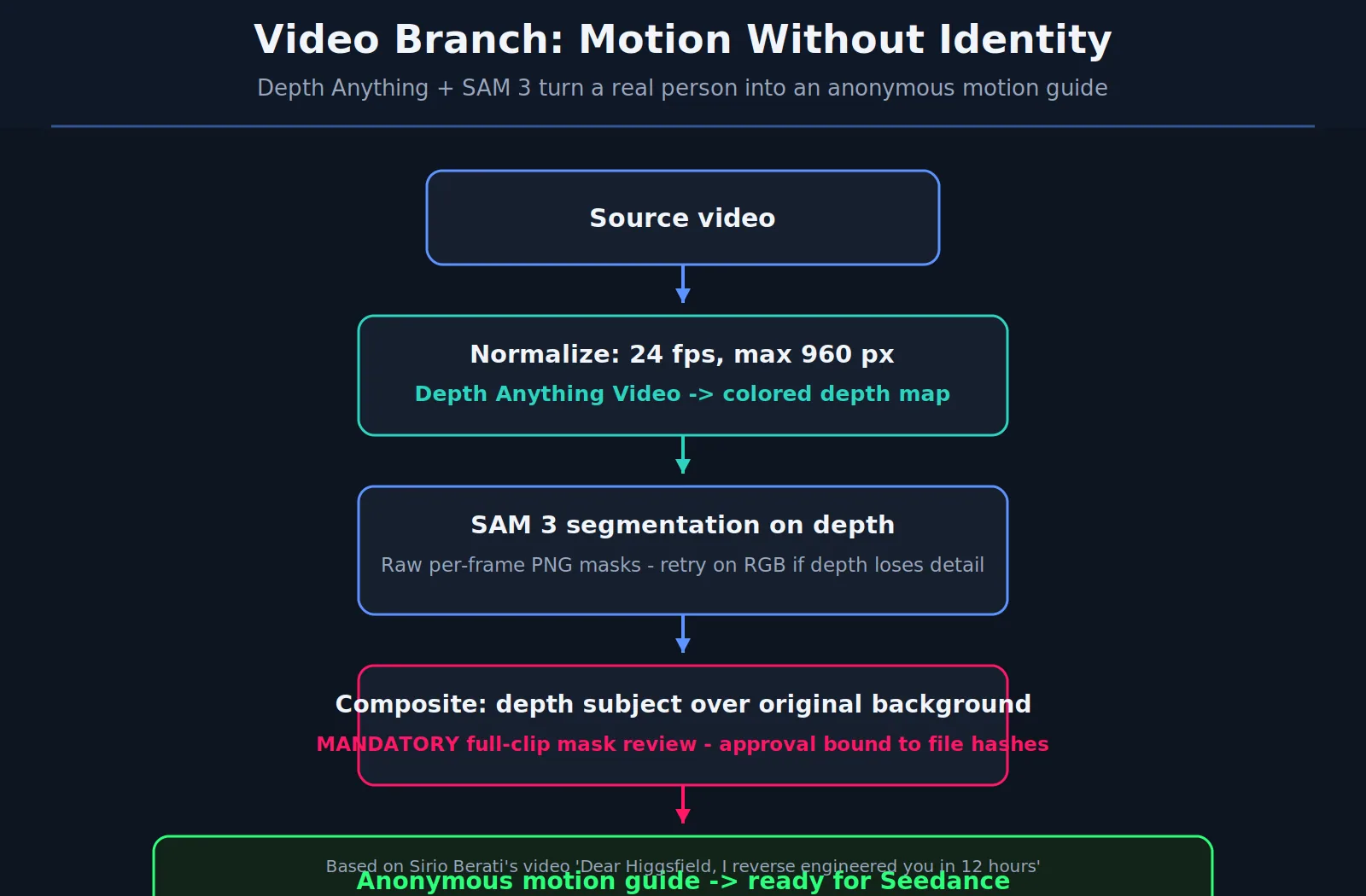
Steps 4 to 6: prepare the video. Depth Anything converts the clip into a colored depth video (normalized to 24 fps, up to 960 px). SAM 3 cuts the people out of the depth frames, and the depth people are composited over the original background. At this point the video shows how things move but not who is moving.
Steps 7 to 8: combine and review. The pitched vocals are baked into the composite MP4 (no standalone audio is sent anywhere). Then a human reviews the preparation before any money is spent. This review gate is mandatory in the workflow.
Steps 9 to 11: generate and finish. Seedance 2.5 (via the Enhancor API, in edit mode) generates a cheap draft. Its audio is discarded and the complete original soundtrack is copied back into the final MP4. Only after explicit approval does the accepted draft get completed at 1080p, with the soundtrack restored again.
Audio branch: vocals without the music
Why not just mute the clip? Because the model needs to hear the voice to move the mouth correctly. Muting kills lip-sync. The video's CapCut trick: pitch-shift the music, then use voice isolation to keep only the vocals. What remains is an acapella with no recognizable soundtrack, so the copyright trigger never fires, but every lip movement is preserved.
Video branch: motion without identity
Depth Anything (available on Hugging Face, Replicate, or FAL) turns each frame into a depth map: closer things brighter, farther things darker. A face becomes an anonymous 3D blob, but every gesture, head turn, and step survives perfectly. SAM 3 then segments the people out of the depth video, and the result is composited over the real background. The workflow forces a full visual review of the mask before anything is sent to Seedance.
Draft mode: stop wasting money
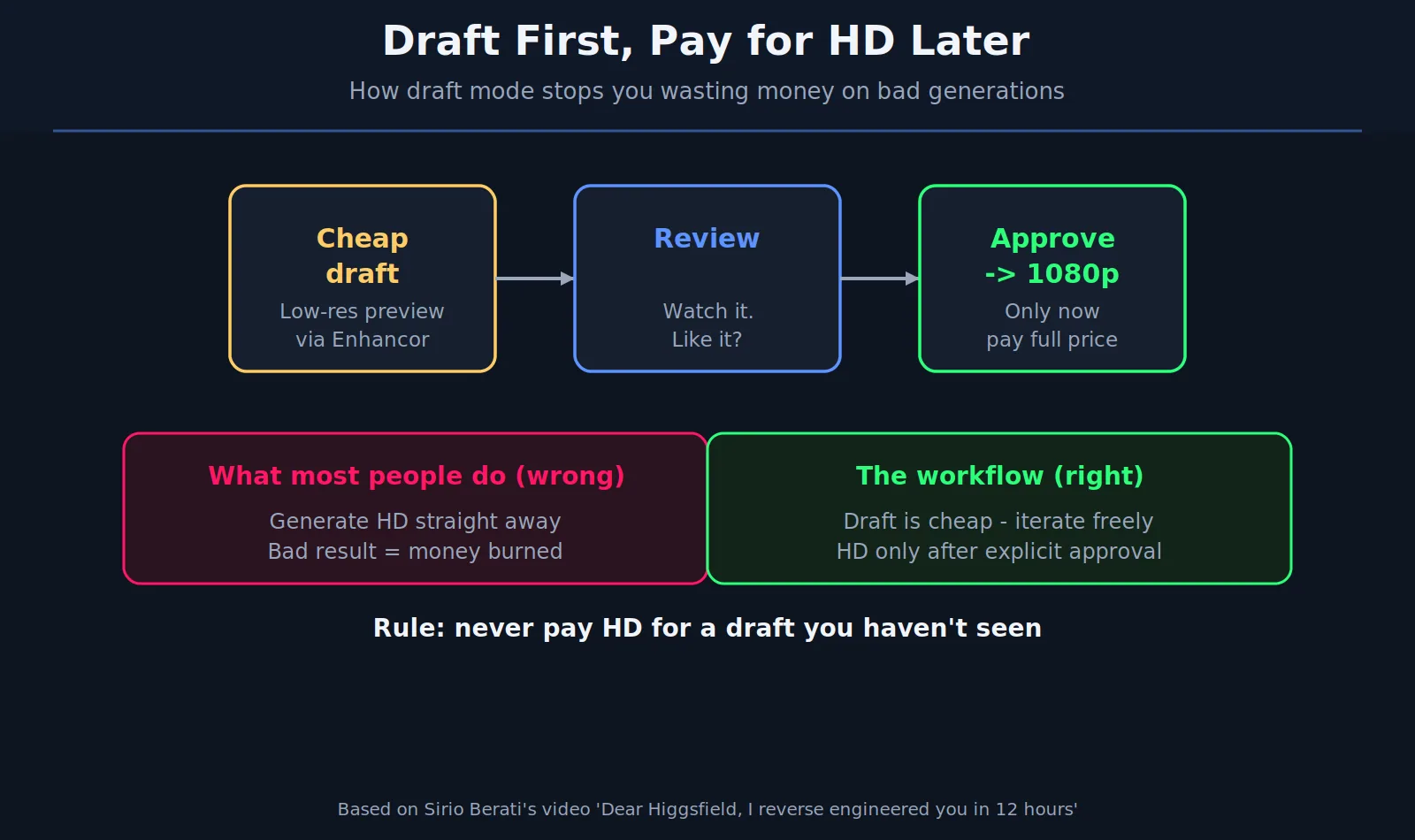
Seedance 2.5 has a draft mode that generates a cheap 480p version you can iterate on until it looks right, then finishes that exact video in 1080p. The common mistake Berati calls out: downloading the draft and re-uploading it as a reference image. Drafts are tied to a task ID, not to the file, so none of the settings carry over and you pay full price to redo it. The rule: iterate free in draft mode, pay for 1080p exactly once.
Two fixes from the first test
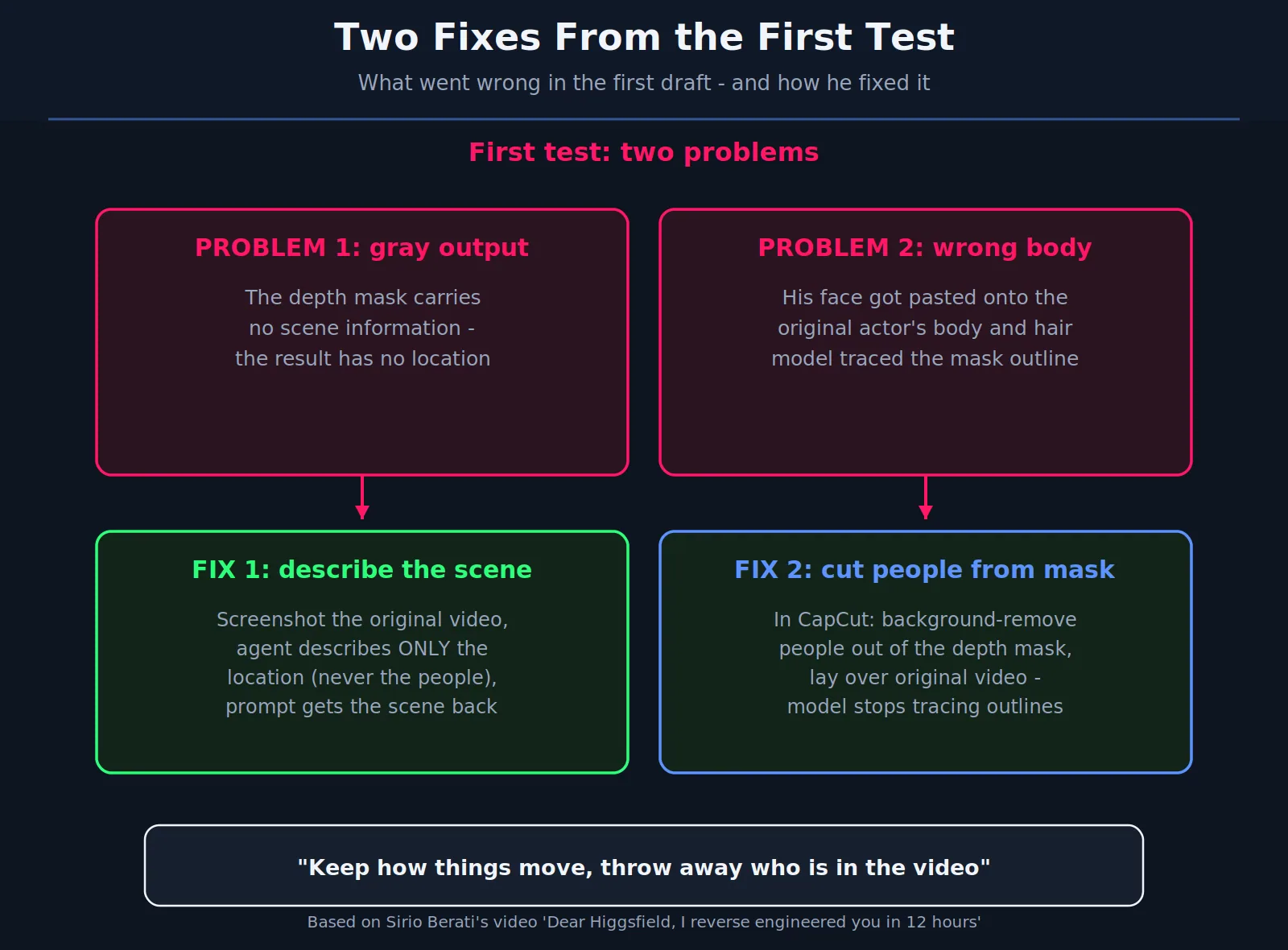
The first draft had two visible problems, and the fixes are the most instructive part of the video:
- Gray, location-less output. The depth mask carries no scene information, so the result had no sense of place. Fix: screenshot the original video and have the agent describe only the location, never the people, then put that description in the prompt.
- Wrong body. His face got pasted onto the original actor's body and hair because the model traced the depth-mask outline. Fix: in CapCut, background-remove the people out of the depth mask and lay the result over the original video. The model stops tracing outlines.
Three modes: depth, face mesh, or both
The repo ships three preparation modes:
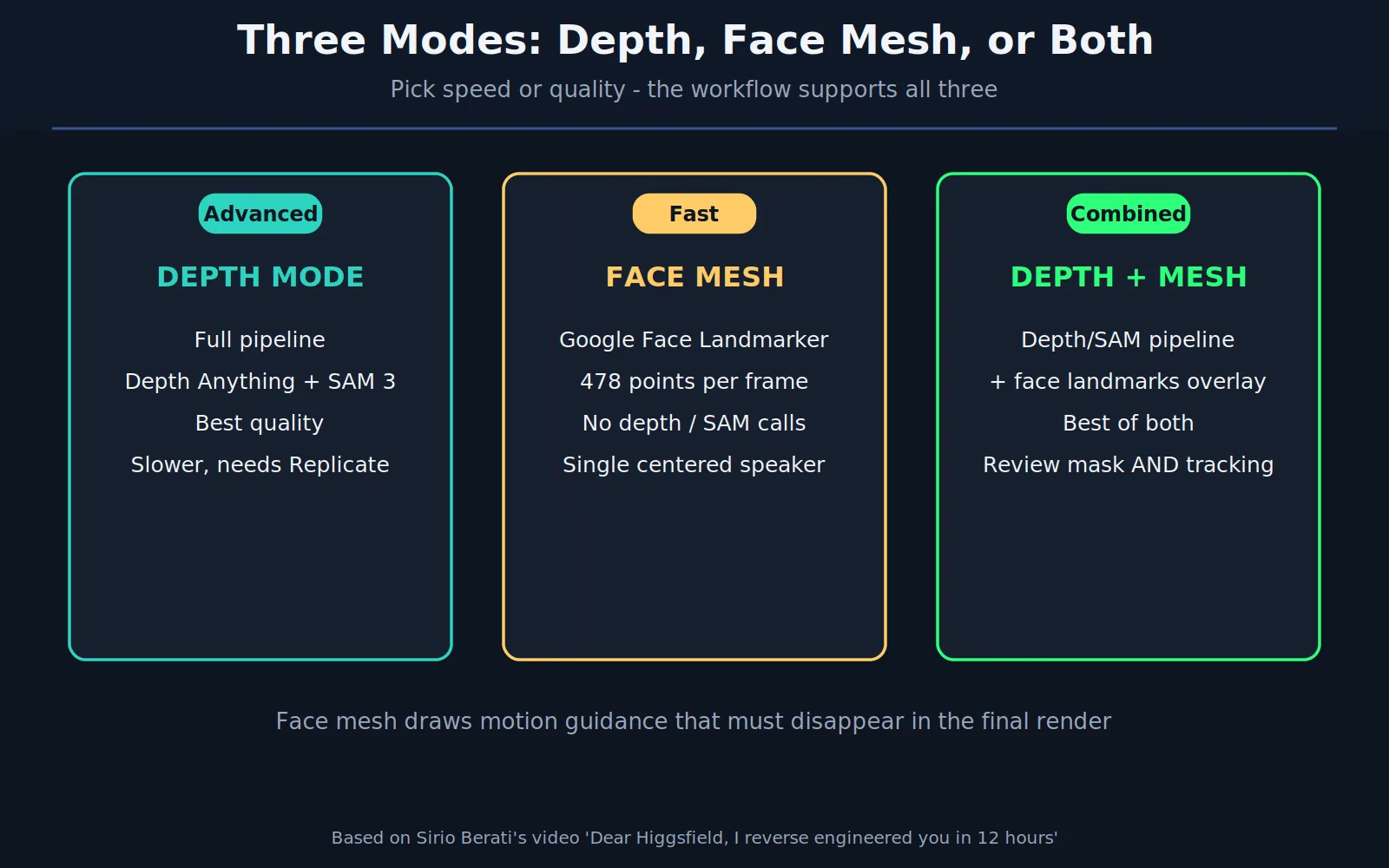
The face mesh alternative deserves its own mention. It uses Google's MediaPipe Face Landmarker, which tracks 478 facial points per frame and draws a wireframe mesh over the face, saved as facelandmarks.json. It makes no depth or SAM calls at all, so it is much faster, and it is ideal for a single centered person talking to camera. The mesh lines are motion guidance for the model and must disappear in the final render. You can also combine both: depth and SAM for the body, face mesh overlaid for the face.
Tech stack
| Layer | Technology |
|---|---|
| Local app | Python, FastAPI, local web UI (upload, review, draft, export) |
| Vocal isolation | Demucs (htdemucs) via Replicate |
| Pitch shift | Rubber Band CLI (+3 semitones, duration preserved) |
| Colored depth | lucataco/depth-anything-video via Replicate |
| Segmentation | lucataco/sam3-video via Replicate, raw per-frame masks |
| Face mesh | Google MediaPipe Face Landmarker (local, 478 points) |
| Generation | Seedance 2.5 via Enhancor API (Edit for image refs, Omni for video refs) |
| Media hosting | Tmpfiles primary, Catbox fallback |
| Agent workflow | Bundled skill + CLI; a coding agent does setup and visual QA |
No local GPU is needed for the default setup. API keys (Enhancor, Replicate) live in a local .env file, and the video warns never to paste keys into a chat.
What to build next
Berati closes with ideas for extending the workflow: add a transcriber, have the agent describe the motion second by second, and clone your own voice. His framing is that the project is a starting point, and the next video goes beyond the basics.
FAQ
Is this really a full reverse-engineer of Higgsfield Genjutsu?
It is a functional rebuild of the observable behavior: motion transfer with identity replacement, using public models. Higgsfield's actual internal implementation is still closed. What the video proves is that the workflow is reproducible without their app.
Do I need Higgsfield or Seedance accounts?
You need API access to Seedance 2.5 (the video uses Enhancor, described as cheaper with no data training) and a Replicate account for Demucs, depth, and SAM 3. The workflow code itself is MIT licensed and free.
Why pitch the vocals up 3 semitones?
It changes the voice timbre enough to dodge voice-based identity matching while keeping timing identical, so lip-sync stays frame-accurate.
Can the face mesh mode replace the depth pipeline?
For talking-head clips with one centered speaker, yes, and it is faster. For full-body motion or multiple people, the depth + SAM pipeline is the right choice. Combined mode uses both.
Where is the original video and code?
Video: Dear Higgsfield, I reverse engineered you in 12 hours by Sirio Berati. Code: Genjustsu-Open-Source-Workflow on GitHub (MIT license).
Credit
Every idea, step, and fix in this article comes from Sirio Berati's video and his open-source release. If you use the workflow, star the repo and join his communities linked in the video description (PublicAI on Skool, TEIN waitlist). CodeMyPixel only wrote this breakdown with original diagrams to make the steps easier to follow.
CodeMyPixel builds custom AI agents and automation for growing teams. If you want a video pipeline like this productionized for your business, talk to us.
- higgsfield
- genjutsu
- ai video
- seedance
- open source