এআই8 মিনিট পাঠলিখেছেন Sabbir Ahmed
We Used Meta Muse for Several Days. Here’s What It’s Actually Like
We have been using Meta Muse for several days at CodeMyPixel for content management, scheduling, reminders, research, and private MCP workflows. Here is what it is actually like, what works, and where it still falls short.

We have been using Meta Muse for the past few days, and honestly, the easiest way to describe it is not as another chatbot.
It feels more like a knowledge partner that can actually sit beside you and get things done.
At CodeMyPixel, we have already started using Muse for content management, scheduling, reminders, research, and a few of our own automation workflows. We also connected private MCP tools to it, which is where things started getting particularly interesting.
Meta launched Muse on September 8, 2026, and it is one of the clearest examples yet of where personal AI agents are heading: AI that does not just tell you what to do, but gets a computer, browser, tools, and a workspace and actually does the work.
What is Meta Muse?
Muse is Meta's personal AI agent. You can give it a goal in natural language and let it work through the steps.
Instead of:
"How do I schedule this?"
You can say:
"Schedule this for tomorrow, remind me about it, and let me know when it is done."
That difference sounds small, but it changes the relationship you have with the AI.
Meta says Muse can browse websites, fill forms, work with connected services, research information, shop online, handle travel-related tasks, create documents, and continue working on tasks after you leave.
Meta's official Muse announcement describes the system as being powered by Muse Spark and operating inside a dedicated Muse Secure VM.
We have actually been using it
This is the part that made Muse interesting to us.
We did not just spend a few minutes asking it random questions. We started giving it actual work.
At CodeMyPixel, we have been using Muse for things like:
- Content management
- Scheduling tasks
- Setting reminders
- Research and information gathering
- Organizing everyday digital work
- Working with connected services
- Testing private MCP tools
- Letting it operate inside a dedicated computer environment
And the experience is surprisingly natural.
You can give Muse a task, explain what you are trying to accomplish, and then let it work through the process. It feels less like talking to an AI and more like handing something to an assistant.
That is probably the biggest thing we noticed after using it for several days.
It feels like a knowledge partner
I would describe Muse as a combination of a knowledge partner and a digital assistant.
A normal AI assistant is great when the answer is the end product.
Muse is more interesting when the answer is only the beginning.
For example, if you are managing content, you do not necessarily want an AI to tell you:
"Here is how you should organize your content calendar."
You want it to actually help organize the calendar.
You might want it to research a topic, prepare something, schedule it, set a reminder, check something later, and report back.
That is the mental model that makes Muse click.
The computer behind the agent
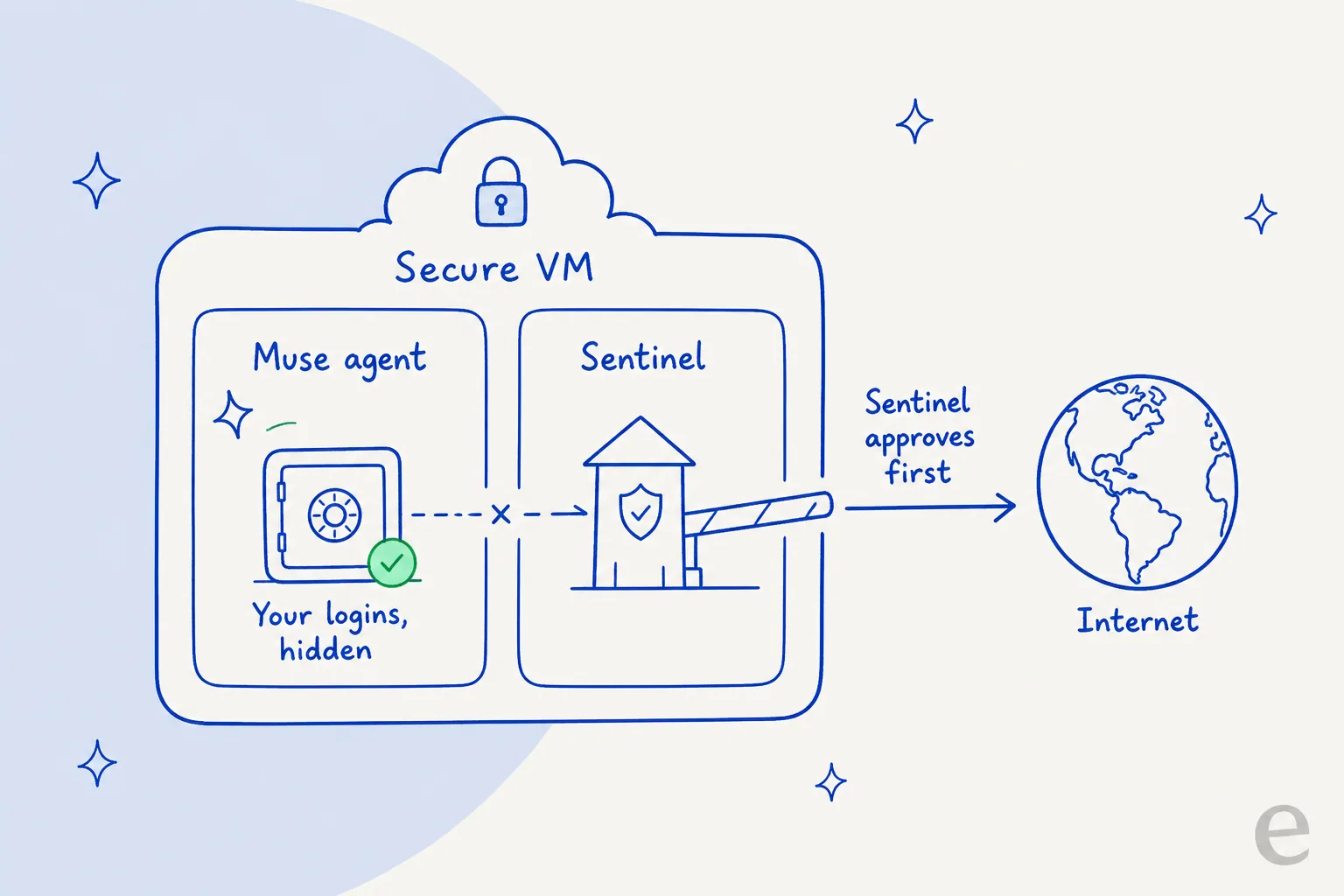
One of the most interesting things about Muse is that the agent gets its own virtual computer.
It is not simply generating text inside a chat interface. The agent can operate a browser and interact with a computer environment while it works.
Meta calls this the Muse Secure VM.
Meta says the environment is isolated and designed to keep the agent, user data, and connected-service credentials separated from the rest of the system. Meta also describes a separate Sentinel security layer that sits between Muse and the internet, with certain sensitive actions requiring user approval.
This architecture is important because it gives the AI somewhere to actually perform the work.
What is inside that computer?
From what we have observed and from community testing, the environment appears to provide roughly:
- 2 vCPU / two-thread AMD EPYC compute
- Around 8 GB RAM
- Around 100 GB of storage
- A browser and Linux-based working environment
The exact resource allocation is not presented by Meta as a formal public hardware specification, so we would treat those numbers as reported or observed infrastructure details rather than an official Meta specification.
The important part is not really whether it has exactly 8 GB or 16 GB.
The important part is that the agent has a computer.
That is a very different architecture from a traditional chatbot.
Why this changes the AI experience
Think about the difference:
Traditional chatbot
You: "Find me three good laptops."
AI: "Here are three laptops."
Agent
You: "Find me a laptop under $1,000, compare the options, check today's prices, and tell me which one meets my requirements."
The agent can browse, compare, collect information, and keep working through the task.
Now add a computer environment and external tools.
The agent can potentially interact with the software you already use.
That is where AI agents start becoming genuinely useful.
Our MCP experiment
This was probably the most interesting part for us as an engineering team.
We connected private MCP tooling to Muse and started experimenting with giving the agent access to tools that are not part of a standard chatbot experience.
MCP, or Model Context Protocol, gives an AI agent a standardized way to interact with external tools and data.
For a developer, this opens up a much bigger possibility:
Your AI agent does not have to live only inside its own ecosystem.
You can expose your own tools, internal services, databases, APIs, dashboards, or workflows.
That means an agent could potentially move from:
"Tell me what is happening in our system."
to:
"Check our system, find what needs attention, make the necessary update, and tell me what you changed."
That is the direction we are particularly interested in at CodeMyPixel.
What we have been using Muse for
Content management
We have been experimenting with Muse around content workflows, including organizing and managing content.
This is one of the areas where an agent makes much more sense than a simple AI writing assistant.
Writing the article is only one part of content management.
There is also research, organization, scheduling, reminders, checking, updating, and follow-up.
Muse can participate in that larger workflow.
Scheduling and reminders
We have also been using it for scheduling and reminders.
This sounds basic, but it is exactly the kind of work that makes an assistant useful.
Instead of keeping everything in your head, you can delegate some of those small tasks and let the agent remember to come back to them.
Research
Muse is also useful when research involves actually visiting multiple websites and interacting with them.
You can give it a research goal instead of manually opening twenty tabs and collecting information yourself.
Everyday digital work
This is probably where the product has the broadest potential.
Email.
Research.
Forms.
Shopping.
Travel.
Documents.
Scheduling.
Reminders.
Websites.
The individual tasks are not revolutionary. Putting them behind an agent that can actually operate a computer is what makes the combination interesting.
Why is the internet so excited about Muse?
Part of the excitement is simply that people are seeing an AI agent behave more like an assistant than a chatbot.
Another part is the infrastructure.
Muse is effectively getting access to a remote computer where it can browse, interact with websites, use tools, and continue working.
That creates a different experience from asking an LLM a question and waiting for text.
The broader idea is sometimes called the agentic internet.
Instead of humans doing every click, an AI agent becomes capable of navigating software and websites on the human's behalf.
Muse is not the only product moving in this direction, but Meta putting this kind of experience into a consumer product makes it much more visible.
There are still some real downsides
After actually using it for several days, Muse is definitely not perfect.
Long-running processes can be killed
This is one of the biggest limitations we noticed.
If you start something that needs to run for a very long time, you cannot assume the process will remain alive indefinitely. The sandbox can eventually terminate long-running processes.
For normal everyday tasks this is usually not a deal-breaker, but it matters if you are thinking about using Muse like a permanent server.
The internet can feel slow
The virtual environment is not always as fast as your own computer.
Some web interactions feel noticeably slower, especially when the task involves loading many pages or repeatedly navigating between websites.
Agents can still get stuck
A weird website interface, unexpected popup, login flow, CAPTCHA, or unusual page structure can still confuse the agent.
So we would not treat Muse as an autonomous employee that can be given absolutely anything and forgotten about.
It is much better thought of as an assistant that can take a lot of work off your plate while still needing supervision for important actions.
The interesting part is not the model
This is probably the biggest takeaway from our experience.
The interesting part of Muse is not simply that Meta has another AI model.
The interesting part is the combination:
AI model + computer + browser + memory + tools + connectors + permissions + background work
That combination is what makes an agent feel different.
And when you connect your own tools through MCP, the possibilities become much larger.
How to try Muse outside the US
Muse is currently rolling out in the United States. Meta's launch announcement says the product is available through iOS, Android, and muse.ai, with WhatsApp support.
If you are outside the US, you may not see access yet.
Some people are using a US VPN to access US-only services, but that is a workaround rather than an official Meta availability method. Availability can also depend on your account and rollout status.
Once you have access, WhatsApp is particularly interesting because you can continue talking to the agent there instead of constantly opening a separate AI application.
Get 1 billion Muse tokens with our invite code
If you are joining Muse, you can use our invite code:
QCCGNB
Join here: https://muse.ai/join
After joining, redeem the code in Settings within 48 hours.
The current referral offer says both people can receive 1 billion Muse tokens after a successful referral redemption.
The exact terms can change, so check the redemption screen in Muse when you join.
Should you try it?
After using Muse for several days, our take is pretty simple:
It is genuinely useful.
Not because it can answer questions better than every other AI.
It is useful because you can give it work.
For us, that has already meant content management, scheduling, reminders, research, and experimenting with private MCP tools.
There are still obvious limitations. Long-running processes can be interrupted, the remote browser can feel slow, and complicated websites can still trip the agent up.
But when it works, it feels different.
You are no longer just asking AI for an answer.
You are giving it something to do.
And that is why we think Muse is worth watching.
Sources
- Meta: Introducing Muse
- Meta AI: Muse
- Meta AI Research: Security and safety for AI agents
- Reuters: Meta launches Muse AI agent
- Axios: Meta debuts Muse
- Meta Muse
- Muse AI
- AI agents
- personal AI agent
- Meta AI
- Muse Secure VM
- AI automation
- MCP
- AI tools
- agentic AI
- AI news