AI6 min read
Grok Bot $20 Review: What the Video Missed
Sharbel A. tested Grok Bot at $20. The real story: what the demo hides, the security tradeoffs, and better AI agent alternatives.

Sharbel A.'s video Grok Bot Is Only $20 Now. Here's What They're Not Telling You has gained over 79,000 views in two days. The headline is hard to ignore: Grok Bot went from $200 to $20 per month. But after testing it for two weeks, the presenter argues the monthly price is not the full story. This article summarizes the video's claims and explains what the $20 tool means for businesses exploring AI agents.
All claims below are attributed to the video, not independently verified by CodeMyPixel.
Key Takeaways
- Grok Bot dropped from $200 to $20 per month, a 90% price cut that makes it one of the cheapest always-on AI team tools available.
- The tool is a team of AI agents living inside one app, each with its own screen on a shared cloud computer.
- The presenter was impressed by setup simplicity, always-on execution, and the ability to learn and self-improve tasks.
- The $20 monthly fee is not the real cost: usage charges, security tradeoffs, and limited control are the hidden price.
- Grok Bot does not allow custom models; everything runs on Grok's own models.
- Compared to Hermes Agent and OpenClaw (free/open-source) or Claude Cowork ($20, closed), Grok Bot trades control for convenience.
What is Grok Bot?
According to the video, Grok Bot is a team of AI agents that live inside one app. Each agent gets a name, a job, and its own screen on a cloud computer that has a browser, a file system, and a shared memory. The presenter compares the setup to "installing an app" — if you can install an app, you can run Grok Bot.
Image: YouTube thumbnail from Sharbel A.'s "Grok Bot Is Only $20 Now" video.
Once a tool like email or a browser is authorized, every bot in the workspace can use it. The computer stays on after the user closes their laptop, which means the agents can continue to work.
What impressed the presenter
The video highlights five strengths:
- Extremely simple setup. The presenter says, "If you can install an app, you can run Grok Bot." The onboarding is designed to get non-technical users to an AI team quickly.
- Shared tool connections. Authorize a service once, and every agent gets access.
- Always-on cloud computer. Agents keep working when the user's laptop is off.
- Learning from a task recording. The bot can record a workflow and repeat it.
- Self-improvement. A bot can rewrite its own instructions to fix mistakes without the user manually editing prompts.
The costs and risks they skip
The presenter is explicit that the $20 sticker price is only part of the cost. The video raises three concerns:
- Usage costs add up. Cloud compute, model calls, and tool actions can push the real monthly cost above $20, especially for always-on agents or frequent tasks.
- Security and privacy. All bots run on a shared cloud computer, and accounts are not isolated. That means one bot can potentially see or affect another's work. Businesses with sensitive data may not be comfortable with this.
- Limited control. Users cannot bring their own models, cannot fully clear a bot's memory, and may hit reliability issues.
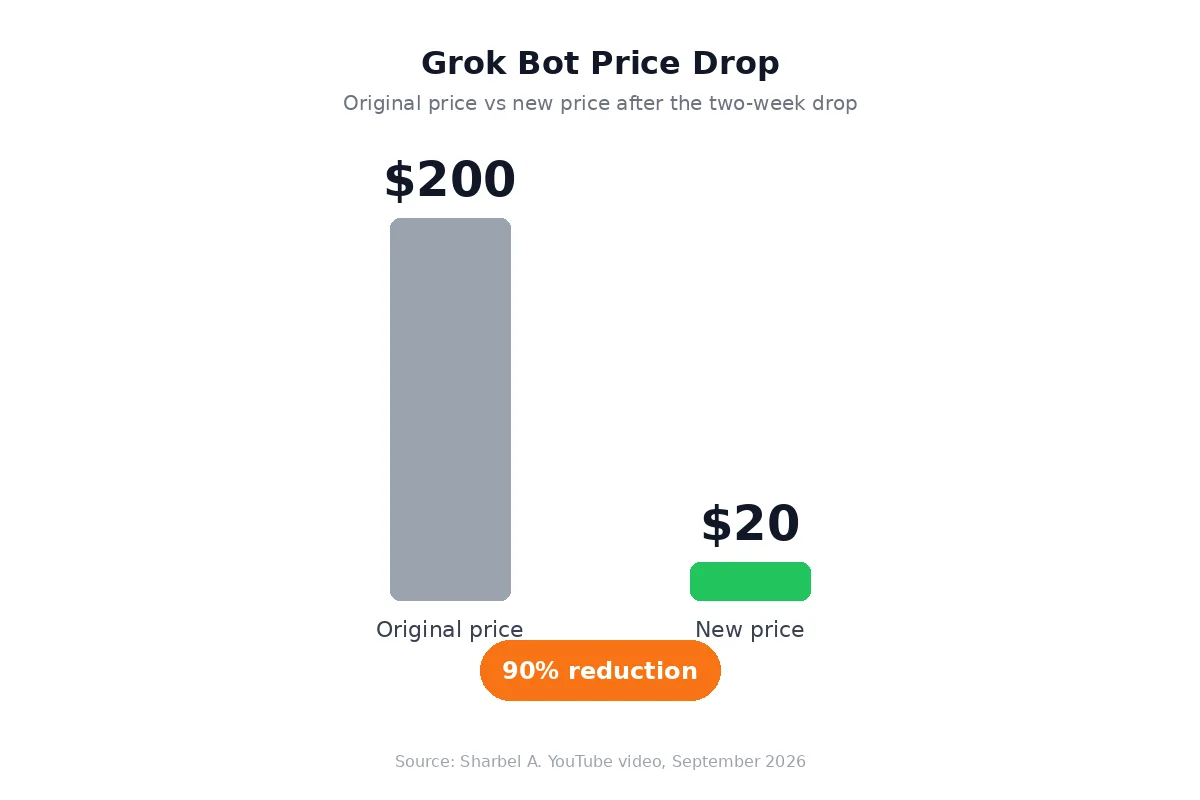 Chart: Grok Bot's price drop from $200 to $20, based on the video. Source: Sharbel A., September 2026.
Grok Bot vs Hermes Agent, OpenClaw, and Claude Cowork
The video compares Grok Bot with three alternatives:
| Tool | Cost | Model choice | Hosting | Best for |
|---|---|---|---|---|
| Grok Bot | $20/month + usage | No (Grok only) | Shared cloud | Non-technical users who want convenience |
| Hermes Agent | Free (open-source) | Yes | Your own machine or cheap server | Technical users who want full control |
| OpenClaw | Free (open-source) | Yes | Self-hosted | Technical teams with DevOps time |
| Claude Cowork | $20/month + usage | No (Claude only) | Closed/Anthropic cloud | Users already in the Claude ecosystem |
The presenter frames the choice as convenience versus control. Grok Bot is the fastest to set up; Hermes and OpenClaw offer freedom at the cost of setup time; Claude Cowork is another $20 closed tool with its own model lock-in.
The AI team demo: what it actually built
The video walks through several live demos:
- Morning brief. One prompt spins up a team of agents that summarize calendar, news, and emails for the day.
- Inbox triage. An agent reads and categorizes incoming email.
- AI news monitoring. A research agent tracks and summarizes new AI releases.
- Landing page builder. The presenter hands a live project to a builder bot and watches it build a landing page.
These are exactly the kinds of tasks that custom AI agents can automate inside a business: daily reporting, lead triage, research monitoring, and content/asset creation.
My honest verdict (from the video)
The presenter's verdict is cautious but positive for the right user: try it free, pick your strongest use case, and then decide whether the $20 monthly fee plus usage is worth the convenience. If control, data isolation, or model choice matters, the open-source path is still better.
What this means for custom AI systems
Grok Bot proves that a $20 AI team is now a marketing reality. For businesses, the lesson is not to buy the tool as-is, but to ask which parts of an AI team you actually need:
- Fast, no-code automation. If the task is low-risk and public, a tool like Grok Bot can be a quick win.
- Private, custom AI agents. If the task touches customer data, finance, or proprietary systems, a custom agent on your own infrastructure is safer.
- Hybrid approach. Many teams will use Grok Bot or Claude Cowork for quick experiments, then build custom agents once the workflow is proven.
CodeMyPixel designs and builds custom AI agent development services and AI automation for business for teams that want the convenience of an AI team without giving up control or security.
Frequently Asked Questions
Is Grok Bot really only $20?
The base monthly subscription is $20, but the video reports that usage costs can add up. The actual cost depends on how many agents run, how often they act, and how much cloud compute they consume.
Can I use my own AI models with Grok Bot?
No, according to the video. Grok Bot runs on Grok's models. You cannot bring your own model or switch to a different provider.
Is Grok Bot safe for business data?
The presenter raises a security concern: all bots run on a shared cloud computer, and accounts are not isolated. For sensitive business data, self-hosted or custom AI agents are a safer choice.
How does Grok Bot compare to Claude Cowork?
Both are $20 monthly tools that run agents on a cloud computer. The main difference is the underlying model family: Grok's models versus Claude. The video suggests testing both to see which fits your workflow.
Should I use Grok Bot or build a custom AI agent?
Use Grok Bot for quick, low-risk experiments. Build a custom AI agent when you need data isolation, model choice, integrations with internal systems, or long-term cost control.
Sources and further reading
- Sharbel A. YouTube video: Grok Bot Is Only $20 Now. Here's What They're Not Telling You
- Grok Bot prompt pack from the video
Get help with your AI agent
If you want an AI team that runs on your terms, CodeMyPixel can help. We build custom AI agents, workflow automation, and AI-powered SaaS for teams that want less manual work without sacrificing control. Contact us to discuss your project.
- Grok Bot
- AI agents
- Grok AI
- Claude Cowork
- Hermes Agent
- OpenClaw
- AI automation
- custom AI agents
- business automation